
How Duplicate Google Listings Trigger Suspensions and How to Resolve Them
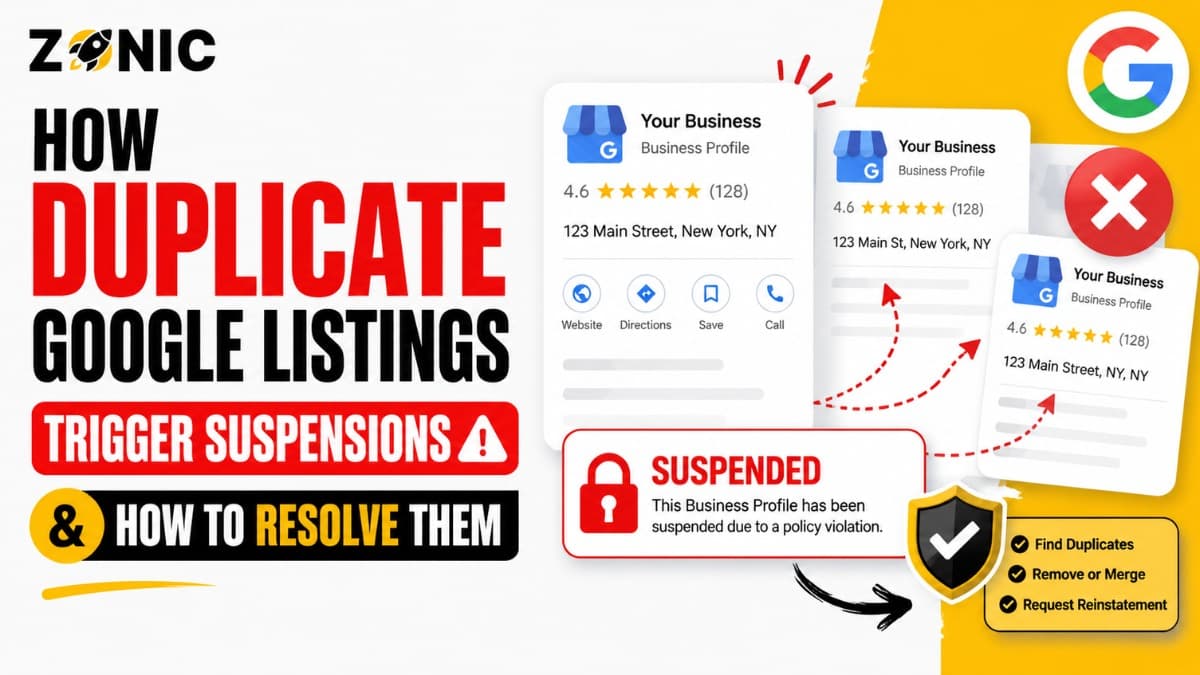
A Google Business Profile can help customers find your business, call your team, read reviews, visit your website, and get directions. For local companies across the USA and competitive markets like NYC, one clean profile can bring real leads every week.
But when more than one Google listing exists for the same business, things can get messy fast.
A duplicate Google listing may look harmless at first. Maybe an old agency created it. Maybe a former employee used another Gmail account. Maybe the business moved and someone made a new profile instead of updating the old one. Sometimes a business owner creates another listing after losing access to the original profile.
The problem is that Google may not know which listing is correct. One profile may show old details. Another may have reviews. One may be verified. Another may be suspended. This confusion can lead to ranking drops, ownership issues, review problems, and in some cases suspension.
Google has official guidance for resolving duplicate profiles and ownership issues. It also says Business Profiles may be suspended or disabled when they do not follow guidelines, and business owners can submit an appeal when they believe a profile should be reinstated.
If your duplicate Google Business listing suspension issue is causing problems, do not rush into deleting or creating another profile. The safest path is to understand which listing is live, which one is duplicate, what information conflicts, and how to remove duplicate GBP issues without hurting your main profile.
Why Duplicate Google Listings Trigger Suspensions
Duplicate listings create confusion because Google expects one clear profile for one real business location or service-area setup. When two profiles compete with each other, trust can drop.
Google May See Conflicting Business Information
When duplicate listings exist, Google may see different names, phone numbers, addresses, categories, websites, or business hours for the same company. That makes it harder for Google to understand which profile should appear.
For example, one profile may show your old address while another shows your new one. One may use your real business name while another has extra keywords. One may have the right phone number while the duplicate has an old tracking number.
To a customer, that looks confusing. To Google, it can look unreliable.
Duplicate Profiles Can Look Like Spam
Google wants local results to be accurate. When several listings appear for the same business, it may look like the business is trying to control more map space than it should.
This is especially risky in competitive industries like roofing, plumbing, HVAC, pest control, garage door repair, legal services, medical services, and home improvement. These industries already face more scrutiny because spam listings are common.
A duplicate may not be created with bad intent, but it can still trigger problems.
How Duplicate GBP Listings Usually Happen
Most duplicate listings are created by accident, not by strategy. The issue often starts small, then becomes serious when the business needs verification, makes major edits, or receives a suspension notice.
Old Agencies or Employees Created Extra Profiles
Many business owners hire agencies or employees to manage local SEO. Over time, those people may leave, change accounts, or lose access. If a new person cannot access the original listing, they may create another one.
That second profile may verify successfully for a while, but it can later be marked as a duplicate or restricted.
This is one of the most common reasons businesses end up with multiple Google listings.
Business Moves Can Create Duplicate Listings
When a business moves, the profile should usually be updated carefully. But some owners create a new listing at the new address instead.
Now Google sees one profile at the old address and another at the new address. If both are connected to the same business name, website, or phone number, it can create duplicate confusion.
The better path is usually to update the existing profile, not start over without reviewing the old one.
Lost Access Can Lead to New Listings
A business owner may lose access to the original Google Business Profile and decide to create another listing. This feels like a quick fix, but it often creates a bigger issue.
Google may still see the old profile as the main business listing. The new one can look like a duplicate, even if the owner created it with honest intent.
Duplicate Google Listings vs Legitimate Multiple Locations
Not every business with more than one profile is doing something wrong. A real company can have multiple listings if each one represents a real, eligible location.
When Multiple Listings Are Allowed
A business with separate physical locations may be eligible for more than one Google Business Profile. Each location should have its own real address, proper signage when required, staff, business hours, and customer-facing presence.
For example, a dental group with offices in Brooklyn, Queens, and Manhattan may have separate profiles if each office is real and eligible.
The issue starts when multiple profiles represent the same business, same location, same phone number, or same service-area setup.
When Multiple Listings Become Duplicates
A duplicate usually appears when two profiles point to the same business identity. They may share the same name, phone number, address, website, service area, or ownership history.
This can happen even if the listings are not exactly identical. Google may still connect them if the signals are too similar.
If your business has several profiles but only one true location or one service-area operation, you may have a duplicate problem.
Signs Your Duplicate Google Business Listing Is Causing Risk
A duplicate listing does not always cause suspension right away. But certain signs show that your profile may already be creating trust issues.
Check for these warning signs:
Two Google profiles show the same business name
One listing has your old address and another has your current address
Both profiles use the same phone number
Both profiles link to the same website
Reviews are split between two listings
One profile says “duplicate” in your dashboard
One profile is verified while another is suspended
Customers call from the wrong listing
Google Maps shows an outdated version of your business
You cannot tell which profile is the main one
This is the first bullet section. If you see two or more of these signs, fix the issue before making more profile changes.
Why a Duplicate Google Business Listing Gets Suspended
A duplicate listing can be suspended because it creates confusion around business identity, location accuracy, ownership, and customer trust. Google may restrict the profile that looks less reliable.
One Profile May Look Less Trustworthy
If two profiles exist, Google may compare signals. One profile may have stronger history, cleaner details, better verification, or more consistent information.
The weaker listing may be treated as a duplicate or restricted. If it also has name stuffing, address issues, or wrong categories, the risk becomes higher.
This is why duplicate issues should be cleaned up carefully, not ignored.
Duplicates Can Trigger Ownership Problems
Sometimes two people control two profiles for the same business. One may be managed by the owner, and another may be controlled by a former agency or employee.
This creates access confusion. Google may not know which account represents the real business owner.
Google’s duplicate profile guidance includes steps for ownership issues and duplicate situations, which shows how common this problem is for Business Profile users.
Duplicate Listings Can Make Appeals Harder
If one of your profiles is suspended and another is still live, your appeal can become more complicated. Google may see the suspended profile as unnecessary or duplicative.
In that case, the appeal needs to be handled carefully. You may need to prove which profile should remain active and which one should be removed, merged, or ignored.
How to Resolve Duplicate Google Listings Safely
Duplicate GBP issues should be handled in the right order. The goal is not just to delete something quickly. The goal is to protect the main profile and remove confusion.
Identify the Main Profile First
Before removing anything, decide which profile is the correct one. Usually, the main profile is the one with the correct business name, current address or service area, proper phone number, real website, active verification, and strongest review history.
Do not guess. Compare both listings carefully.
If one profile has reviews and the other does not, be extra careful. Removing the wrong profile can create unnecessary damage.
Compare Every Business Detail
Look at the business name, address, phone number, website, category, service area, hours, photos, reviews, and ownership access on each listing.
Small differences matter. A duplicate may exist because one listing was created years ago and never updated. Another may have been made during a move or agency transition.
Once you understand the differences, you can decide whether to request access, suggest edits, remove the duplicate, or ask for help.
Avoid Creating a Third Listing
If you already have two listings, do not create another one. A third profile usually makes the situation worse.
Business owners sometimes create another listing because they are frustrated with the suspended duplicate. But Google may connect the new listing to the old ones and restrict it too.
Fix the existing problem first.
When to Remove Duplicate GBP Listings
Removing a duplicate GBP should be done only after you understand which profile should stay. Removing the wrong one can affect reviews, visibility, and customer trust.
Remove the Listing That Is Clearly Not Needed
A duplicate that has wrong information, no review value, no active use, and no reason to exist may need to be removed or reported as a duplicate.
Google’s duplicate profile help page gives guidance for resolving duplicate profiles and ownership problems, including situations where multiple profiles exist for the same business.
The exact path may depend on whether you own the duplicate, whether it appears on Maps, and whether it is already marked as a duplicate.
Do Not Remove the Profile With Real Value Too Fast
If a duplicate has years of reviews or a strong history, do not remove it without reviewing your options. Sometimes a merge or support request may be safer than a simple deletion.
Review value, verification status, and business accuracy all matter.
If you are unsure, get help before taking action. A rushed removal can create a bigger local SEO problem.
How to Handle a Suspended Duplicate Google Business Listing
A suspended duplicate is tricky because it may not be worth reinstating if another correct profile already exists. The right move depends on the full setup.
Decide Whether the Suspended Listing Should Stay
Ask this first: is the suspended profile the correct profile, or is it truly a duplicate?
If the suspended profile is the real main profile with reviews, history, and correct information, you may need to fix it and appeal.
If the suspended profile is an old duplicate with wrong details, the better move may be to focus on protecting the correct live profile and resolving the duplicate.
Fix Policy Issues Before Appealing
Google says business owners should make sure their profile follows guidelines before submitting an appeal for a suspended or disabled profile.
That matters with duplicates. If the suspended profile has an old address, keyword-stuffed name, wrong category, or mismatched phone number, appealing without fixing the issue can fail.
Clean the profile first when possible. Then appeal only if that profile truly needs to be restored.
Evidence That Helps Resolve Duplicate GBP Problems
When duplicate listings cause suspension, evidence should prove which profile is real, which details are current, and why one listing should remain active.
Helpful evidence may include:
Business license with the current business name
Business registration or DBA document
Utility bill or lease for the correct location
Tax document or insurance document
Website screenshot showing the correct NAP
Storefront photos with permanent signage
Branded vehicle photos for service businesses
Screenshots of duplicate listings
Proof of ownership or access history
Notes showing which listing is old or incorrect
This is the second and final bullet section. Keep the evidence clean and organized so the issue is easier to understand.
Mistakes to Avoid When Removing Duplicate GBP Listings
Duplicate issues can become worse when business owners rush. A careful process protects your reviews, ranking history, and main profile.
Do Not Delete Without Checking Reviews
Before removing or reporting a duplicate, check whether it has reviews. Reviews are valuable, and losing them can hurt trust.
If reviews exist on both profiles, the issue may need a more careful merge or support process.
Do Not Mark the Wrong Profile Closed
Marking the wrong profile as permanently closed can confuse customers and hurt visibility. If the live profile customers use gets marked closed, calls and trust can drop quickly.
Always confirm which listing is outdated before taking action.
Do Not Let Old Managers Keep Access
If an old agency or employee still has access, they may accidentally make changes or create more confusion.
Clean up profile access. The real business owner should control the main listing, and old users should be removed when they no longer manage the account.
How Zonic Resolves Duplicates Google Listing Suspensions
Zonic helps businesses across the USA and NYC clean up duplicate Google Business Profile issues, protect the correct listing, and handle suspension problems with a safer process.
Duplicate Listing Audit
Zonic reviews all profiles connected to the business name, phone number, address, website, and service area. The goal is to find which listing is correct and which listing is creating risk.
This matters because duplicate problems are not always obvious from the dashboard.
Suspended Duplicate Review
If a duplicate profile is suspended, Zonic reviews whether that listing should be appealed, removed, merged, or left alone while the main profile is protected.
The goal is to avoid wasting time trying to reinstate a profile that should not exist.
Profile Cleanup and Prevention
After the duplicate issue is resolved, Zonic helps clean up NAP consistency, profile access, website details, citations, and service-area setup.
A clean profile setup reduces the chance of future duplicate confusion and suspension risk.
Conclusion
Duplicate Google listings can trigger suspensions because they confuse Google, split trust signals, create ownership problems, and make customers see conflicting business information.
If your business has more than one listing, do not create another profile and do not delete anything too fast. First, identify the main profile. Then compare the details. Check reviews, ownership, address history, phone numbers, and website links. After that, decide whether the duplicate should be removed, merged, corrected, or appealed.
If your duplicate Google Business listing suspension issue is affecting your visibility, Zonic can help you clean it up safely.
Call Zonic Media today at (302) 726-9736 or visit us at 8 The Green, STE B, Dover, Kent, DE 19901, United States, for help with duplicate GBP problems, suspension support, and Google Business Profile recovery across the USA and NYC.