
How Pest Control Companies Can Recover a Suspended Google Business Profile
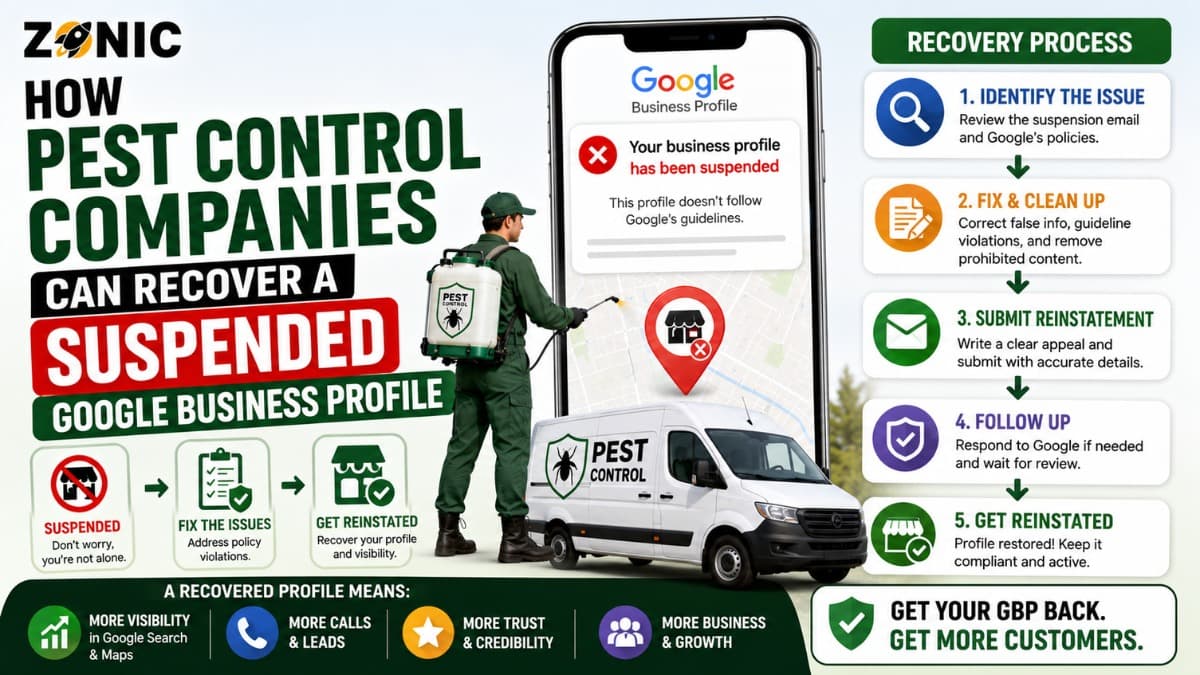
When a pest control GBP suspended issue happens, it can affect leads almost immediately. Your company may stop showing properly on Google Maps for termite control, bed bug treatment, rodent removal, mosquito control, wasp nest removal, ant treatment, commercial pest management, or emergency exterminator searches.
For a pest control business, this can be more than a visibility problem. Many customers search when they need help quickly. A homeowner may have bed bugs spreading through a bedroom. A restaurant may need urgent rodent control before an inspection. A property manager may need recurring pest service for several buildings. If your profile is suspended, those high intent calls may go to another company.
The difficult part is that many pest control companies do not know what caused the suspension. The profile may have looked fine before. Then Google restricts it, and the business owner starts guessing.
Some companies create another listing. Some change the business name several times. Some upload documents that do not match the profile. Others appeal before checking for duplicate profiles, address issues, service-area problems, or category mismatches.
A better recovery process starts with a careful review. You need to confirm that the profile accurately represents the real pest control company, fix any risky details, prepare strong evidence, and use the official appeal path.
This guide explains why pest control Google Business Profiles get suspended, what to check before appealing, what evidence may help, and how to protect the listing after reinstatement.
Why Pest Control Companies Get Suspended on Google
Pest control companies often operate as service-area businesses. Technicians visit homes, apartments, restaurants, warehouses, schools, offices, and rental properties. Many customers never visit the company’s office.
That setup is allowed on Google, but it has to be represented correctly. If the company shows a public address, Google may expect that customers can visit that location during posted business hours. If the address is a home, mailbox, virtual office, shared desk, or unstaffed dispatch location, the profile may face risk.
Pest control is also a competitive local category. There are many companies trying to appear in multiple cities, suburbs, and service zones. Some businesses create listings for towns where they do not have real offices. Some add extra service keywords into the business name. Some use old phone numbers, old addresses, or duplicate profiles created by previous marketing teams.
Google’s systems can flag profiles that look unclear, inconsistent, or misleading.
A legitimate exterminator can still get suspended if the profile setup does not clearly match the real business.
Do Not Create a New Pest Control Listing After Suspension
Creating another Google Business Profile after a suspension may feel like a fast solution, but it usually creates more risk.
Google’s suspension guidance says not to create a new business profile for the same business while an appeal is under review. If the same business already has a restricted profile, opening another one can look like a duplicate or an attempt to avoid the review process.
A new profile does not remove the issue that caused the first suspension. Google may connect both listings through the same phone number, website, address, business name, service area, category, owner account, or manager account. If that happens, the new listing may also become restricted or create duplicate confusion.
The original profile may also have valuable reviews, photos, service history, customer questions, posts, and ranking signals. Starting over can mean losing trust that took years to build.
For most pest control companies, the safer path is to recover the original profile instead of creating a replacement listing.
Check Whether Your Pest Control Business Is Service-Area or Hybrid
Before submitting an appeal, confirm how your business actually serves customers. A service-area pest control company travels to customers and does not receive customers at the business address. A hybrid pest control business has a staffed office where customers can visit and also sends technicians to homes and commercial properties.
This distinction matters because the profile setup should match the real customer experience.
If customers do not visit your office, the profile should not make the location look like a storefront. If customers can visit, the address should be real, staffed, and supported by proof such as signage, office photos, lease documents, or utility bills.
Service areas should also be realistic. A pest control company can serve multiple cities or counties, but that does not mean it should create a separate profile for every town.
Google expects service-area details to be specific and accurate. Overly broad or misleading service areas can weaken trust.
For pest control companies, this is especially important because emergency searches are very location based. The profile should show where the business genuinely works, not every city the company wants to rank for.
Common GBP Suspension Triggers for Pest Control Companies
A suspended pest control profile often comes from a profile detail that appears inconsistent, over-optimized, or difficult to verify. Before submitting an appeal, check the profile carefully.
Possible Issue | Why It Can Hurt a Pest Control GBP | What to Review |
Keyword-stuffed business name | Google expects the name to match real-world branding | Compare the profile name with license, website, trucks, invoices, and uniforms |
Public home address | Customers may not visit that location | Confirm whether the address should be hidden |
Virtual office or mailbox | Unstaffed locations can create eligibility concerns | Check whether the location is a real customer-facing office |
Duplicate profiles | Multiple listings for one pest control company confuse Google | Search old names, phone numbers, websites, and addresses |
Fake city listings | Serving a city is not the same as having an office there | Remove risky extra profiles that do not represent real locations |
Wrong primary category | The category should describe the core business | Check whether the main category fits pest control services |
Website mismatch | Conflicting business details can weaken the appeal | Match name, phone, address, and service areas |
Recent major edits | Sudden profile changes can trigger review | Check edits to name, address, phone, website, or category |
This table should be reviewed before the appeal. If the same issue is still present, the reinstatement request may be weaker.
Review the Pest Control Business Name Carefully
The name on the Google Business Profile should match the real-world name of the pest control company. It should not include extra services, cities, or marketing phrases unless those words are part of the actual business name.
For example, a company should not add phrases like “Best Exterminator,” “Emergency Bed Bug Removal,” “Termite Control Near Me,” or a list of service cities just to improve ranking.
That can create suspension risk.
The business name should match your website, license, insurance documents, invoices, truck branding, uniforms, yard signs, office signage, and customer-facing materials.
Pest control companies often want to rank for many service types. Termites, bed bugs, rodents, ants, roaches, mosquitoes, wasps, and wildlife control may all be important. But the profile name should not be used like a keyword list.
The cleaner approach is to keep the business name accurate and use services, website pages, posts, photos, and content to explain what you offer.
Review Address Visibility and Service Areas
Address setup is one of the biggest risk areas for pest control companies. Many pest control businesses operate from a home base, warehouse, private office, dispatch center, or small commercial location.
That can be fine if the profile reflects the real setup.
If customers do not come to your location, showing the address publicly may create problems. The profile should be set up as a service-area business rather than a public storefront.
If the company has a staffed office where customers can visit, the public address should be accurate. The office should be open during listed hours and supported by real-world proof.
Service areas should match where technicians actually travel. Do not add cities that are too far away or places the company cannot serve consistently.
Also avoid creating multiple profiles just to target nearby cities. A pest control company may serve several locations from one valid profile. Separate profiles should only exist when there are real, eligible, separately staffed locations.
Search for Duplicate Pest Control Profiles
Duplicate listings can create serious problems during reinstatement. A duplicate may come from an old agency, a former owner, a franchise setup, an employee, a directory scrape, or a lead generation campaign.
Before appealing, search Google Maps for your business name, old business names, phone number, old phone numbers, website URL, current address, old addresses, and main service terms.
Look for listings that show the same company under slightly different names.
For example, one profile may say the brand name, another may say “bed bug exterminator,” and another may use an old city-based name. If they point to the same phone, website, or business, Google may see confusion.
Do not delete or mark listings closed without understanding the impact. Some old profiles may have reviews or ownership history. Others may need a proper duplicate or ownership resolution path.
A clean recovery case should make the main profile easy to identify.
Prepare Evidence for Pest Control GBP Reinstatement
Google may ask for evidence when you appeal a suspended profile. Good evidence should prove that the pest control company is real, eligible, and accurately represented.
For pest control companies, useful evidence may include business registration, pest control license, applicator license, pesticide certification if applicable, insurance certificate, tax certificate, business utility bill, lease, office photos, warehouse photos, branded vehicle photos, uniforms, equipment photos, and website screenshots.
The evidence should match the profile.
If the profile shows one business name but the license shows another, prepare an explanation that connects the legal entity with the public-facing brand. If the address has a suite number, make sure documents and photos support the same location.
For service-area businesses, branded vehicles, uniforms, equipment, and licensing can be especially helpful because they show the company travels to customers.
Avoid uploading customer invoices, treatment records, pest reports with private addresses, account numbers, or anything that exposes customer information. Evidence should prove the business without sharing sensitive client data.
How to Submit the Appeal Properly
Use the official Google Business Profile appeal process while signed in to the Google account that manages the suspended profile.
Select the restricted profile and review any moderation reason or policy information shown. Do not rush through this step. The reason can help you understand what Google wants reviewed.
Before submitting, make sure the profile has been corrected. The name should be accurate. The address or service-area setup should match the business model. The website and phone number should be consistent. Duplicate listings should be documented.
If Google allows evidence, upload the strongest matching documents. Google says evidence should match the business name and address on the profile, so avoid confusing or outdated files.
Your message should be short and factual. Explain that the pest control profile has been reviewed, inaccurate details have been corrected if needed, and the attached evidence supports the real business name, address, and eligibility.
Do not write a long complaint about lost calls or competitors. The appeal should be easy to review.
What to Do While the Appeal Is Pending
After submitting the appeal, keep the case stable. Do not create another listing. Do not change the business name repeatedly. Do not switch addresses. Do not keep changing service areas. Do not submit repeated appeals before Google responds.
A pending review should stay clean. While waiting, review your website and major citations. Make sure the business name, phone number, address or service area, license information, and pest control services are consistent.
Also review who has access to the profile. Remove old agencies, former employees, or unknown managers who should not control it.
For pest control companies, consistency matters because licenses, service areas, and operating locations may appear across several online sources. If those sources conflict with the profile, the appeal can look less clear.
If the Pest Control Appeal Is Denied
A denied appeal is frustrating, but it does not always mean the profile cannot be recovered.
Review the denial and look for unresolved issues. Was the business name still over-optimized? Was the address not eligible? Were there duplicate profiles? Did the license show a different name? Did the website show different service areas or phone numbers?
Do not resubmit the same weak evidence.
If additional review is available, use stronger proof that was not included before. This may include clearer license documents, insurance proof, business registration, branded vehicle photos, office or warehouse photos, and website details that match the profile.
If the problem is the business setup itself, fix the setup first. Evidence cannot always overcome an ineligible address, misleading profile name, or duplicate listing pattern.
The second request should be cleaner than the first one.
Protect the Pest Control Profile After Reinstatement
After reinstatement, avoid making several major edits immediately. A sudden wave of changes can trigger another review.
Start with a careful profile check.
Confirm the business name, primary category, phone number, website, hours, address visibility, service areas, services, photos, and manager access.
Then improve the profile gradually.
Add real pest control photos that show branded vehicles, uniforms, equipment, office signage, safe work practices, and general service activity. Avoid customer-sensitive images. Do not show private home details, treatment paperwork, customer names, or account information.
Keep services accurate. Add termite control, rodent control, mosquito control, bed bug treatment, commercial pest management, and other real services if they apply. Do not repeat city names or stuff keywords into every field.
A reinstated profile should look stable, real, and trustworthy.
Pest Control GBP Recovery Checklist
Use this checklist before submitting or resubmitting your appeal:
Review the business name for extra keywords
Confirm whether the address should be shown or hidden
Check that service areas are accurate and realistic
Make sure the primary category fits pest control
Search for duplicate pest control profiles
Match website name, phone, address, and service areas
Prepare licensing, registration, utility, or lease evidence
Add branded proof such as vehicles, uniforms, equipment, or signage
Remove old agency or employee access
Avoid creating a new profile while the appeal is pending
This checklist helps make the reinstatement case easier to understand.
How Zonic Helps Pest Control Companies With GBP Reinstatement
Zonic helps pest control companies review suspended Google Business Profiles before appeal mistakes make the situation harder.
The review starts with the profile setup. Zonic checks the business name, service-area configuration, address visibility, category, phone number, website, recent edits, manager access, and duplicate listing risks.
For pest control companies, licensing and service-area accuracy are especially important. Zonic helps identify whether the profile matches the real company, service model, and documentation.
Zonic also reviews evidence before submission. This may include business registration, pest control license, applicator certification, insurance documents, utility bills, lease proof, branded vehicle photos, office proof, and website consistency.
If the first appeal was denied, Zonic can help review what may have been missing and prepare a cleaner additional review request when that option is available.
The goal is not to send repeated appeals or make random edits. The goal is to build an accurate, organized, and easy-to-review reinstatement case.
Conclusion
A suspended Google Business Profile can hurt a pest control company quickly because many customers search when they need immediate help. Termite issues, rodent problems, bed bugs, roaches, mosquitoes, and commercial pest concerns often lead to urgent calls.
But the wrong reaction can make recovery harder.
Do not create another listing for the same business. Do not stuff keywords into the profile name. Do not use fake office locations. Do not submit mismatched evidence. Do not keep appealing without fixing the real issue.
Instead, review the profile carefully. Check the business name, address setup, service areas, category, website, duplicate listings, licenses, and recent edits. Prepare evidence that proves the pest control company is real, eligible, and accurately represented.
Then use the official appeal process and keep the case clean.
If your pest control Google Business Profile is suspended and you are not sure what to do next, you can reach out to Zonic for a careful review before submitting or resubmitting an appeal.
Call Zonic Media at (302) 726-9736 or visit 8. The Green, Suite B, Dover, DE 19901, to request help with Google business pest control reinstatement for your company in New York City or anywhere across the United States.