
Why HVAC Companies Get Their Google Profiles Suspended and How to Fix It
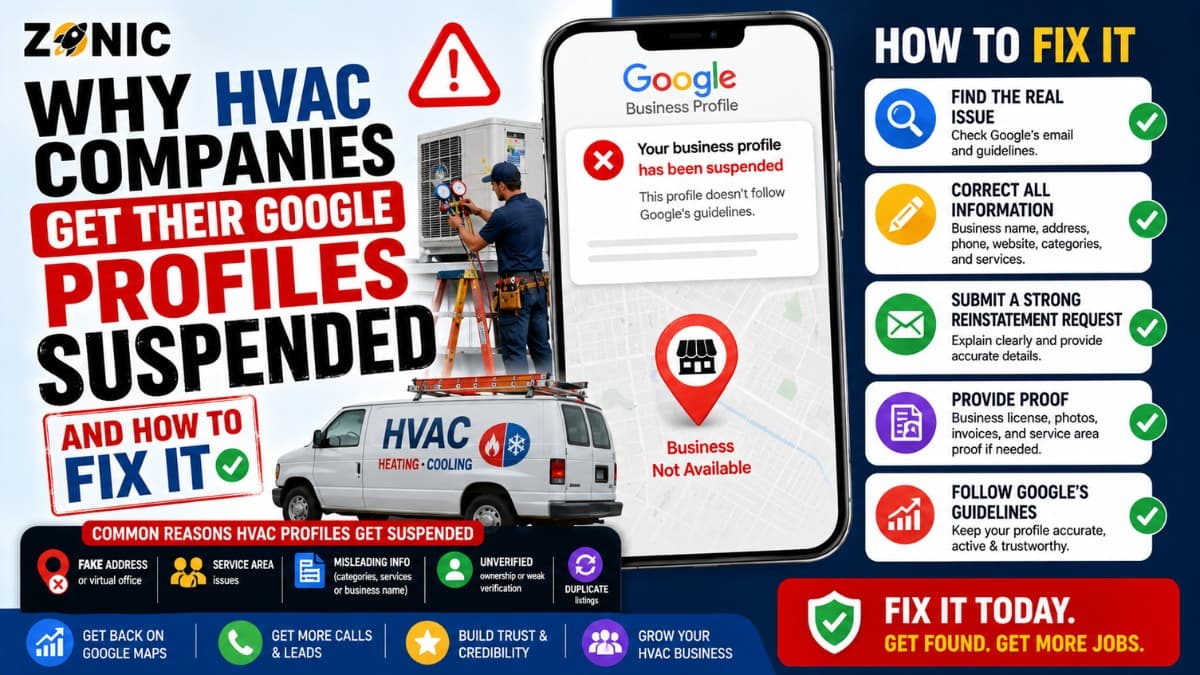
When an HVAC Google Business suspended issue happens, it can feel like your lead flow stops without warning. One day your company is showing on Google Maps for heating repair, AC installation, emergency HVAC service, ductless mini split work, or furnace replacement. The next day, your profile is restricted, hidden, or no longer performing the way it should.
Google Business Profile visibility often brings calls from homeowners and commercial property managers who need urgent help. A no heat call in winter, a broken AC call in summer, or a weekend emergency can turn into real revenue quickly. When the profile is suspended, those high intent searches may go to competitors instead.
The biggest mistake is reacting too fast.
Some HVAC owners create a new listing. Some change the business name again and again. Some upload random documents. Others appeal before checking the real issue. These steps can make a GBP suspension HVAC company case harder to fix.
A safer approach is to slow down, review the profile, correct the problem, prepare matching evidence, and use the official appeal process. This guide explains why HVAC profiles get suspended, what to check first, what evidence may help, and how to protect the listing after reinstatement.
Why HVAC Companies Are More Likely to Face GBP Suspensions
HVAC companies often operate as service-area businesses. That means technicians travel to customers instead of customers visiting an office. This business model is allowed on Google, but the profile setup must be accurate.
Many HVAC businesses use a home office, warehouse, shared office, private office, or dispatch location. Some have a public showroom or staffed office. Others have no customer-facing location at all.
That difference matters.
If customers do not visit the location during posted business hours, showing the address publicly can create risk. If the company uses a virtual office, mailbox, or location that is not truly staffed, the profile may look questionable.
HVAC is also a competitive local SEO category. Google sees many lead generation profiles, duplicate listings, fake city listings, keyword-heavy names, and companies trying to rank in service areas where they do not have a real location.
A legitimate HVAC company can still get suspended if the profile setup looks unclear, inconsistent, or over-optimized.
Do Not Create a New HVAC Profile After Suspension
Creating a new Google Business Profile after suspension may feel like a quick fix, but it can create duplicate problems. Google’s suspension guidance says not to create a new business profilehidden, for the same business while an appeal is under review.
A new listing does not erase the issue that caused the original restriction. Google may connect the new listing to the suspended one through the same phone number, website, service area, address, owner account, category, or business name.
That can make the case more confusing.
The original HVAC profile may have reviews, customer photos, service history, posts, ranking signals, and years of trust. Starting over with a new profile can mean losing that value. Even if the new profile appears for a short time, it may also get suspended if the same setup problem still exists.
For most legitimate HVAC companies, it is better to review and fix the original profile than to create another listing.
Check Whether Your HVAC Company Is a Service-Area or Hybrid Business
Before appealing, make sure the business model is represented correctly. HVAC companies usually fall into one of two categories.
A service-area HVAC business travels to customers and does not serve customers at its business address. A hybrid HVAC business has a staffed location customers can visit and also sends technicians to customer locations.
Google’s guidance explains that service-area businesses visit or deliver to customers directly but do not serve customers at their business address. It also says service-area businesses can only have one profile for the whole area they serve.
This is important because many HVAC suspensions come from address confusion.
If the company is service-area only, the profile should not make it look like customers can visit an office when they cannot. If the company is hybrid, the public address should be real, staffed, and customer-facing during business hours.
A company that serves many towns should not create a separate listing for each town unless each one is a real eligible location.
Common Reasons HVAC Google Business Profiles Get Suspended
Many suspensions come from details that look small but affect trust. HVAC companies should review these areas before submitting an appeal.
Possible Issue | Why It Can Cause Trouble | What to Review |
Keyword-stuffed business name | Google expects the name to match real-world branding | Compare GBP name with license, trucks, website, and invoices |
Public home address | Customers may not be able to visit that location | Confirm whether the address should be hidden |
Virtual office or mailbox | Unstaffed locations can create eligibility issues | Check if the location is real and staffed |
Duplicate profiles | Multiple listings for one HVAC company confuse Google | Search old names, phone numbers, and addresses |
Wrong category | Category should match the core HVAC business | Review whether the main category fits heating and cooling |
Fake city listings | Serving a city does not mean having an office there | Remove risky extra profiles |
Website mismatch | Conflicting information weakens trust | Match name, phone, address, and service areas |
Recent major edits | Sudden changes can trigger review | Check recent edits to name, address, category, and phone |
For HVAC companies, the most common problems are usually service-area setup, address visibility, duplicate profiles, and keyword-heavy business names.
Review the HVAC Business Name Before Appealing
The business name on your Google Business Profile should match the real-world name of the company. It should not include extra service phrases, city names, emergency terms, or ranking keywords unless those words are part of the real business name.
For example, an HVAC company should not add phrases like “Best AC Repair,” “Emergency Furnace Repair,” “Affordable HVAC Near Me,” or a long list of cities to the profile name.
That can create suspension risk.
The name should match your website, business license, insurance documents, invoices, truck branding, uniforms, yard signs, and customer-facing materials.
HVAC owners sometimes add service terms because the market is competitive. But Google Business Profile is not the place to force every keyword. The profile name should represent the business, not act like an SEO title tag.
If the profile name has extra words that are not part of the real company name, correct it before preparing the appeal.
Review the Address and Service-Area Setup
Address setup is one of the biggest reasons HVAC profiles run into trouble. Many HVAC companies work from a dispatch office, warehouse, private office, or home office. That may be normal for the business, but the GBP must show it correctly.
If customers do not visit your location, the address should usually be hidden and service areas should be listed instead.
If customers do visit your office, the location should be real, staffed, and able to receive customers during posted hours. The business name should be visible through signage, office proof, or other real-world signals.
A virtual office or mailbox is risky if it does not represent a real customer-facing business location.
Service areas should also be realistic. An HVAC company may serve several cities, counties, or neighborhoods from one profile. That is fine when accurate. The problem starts when the company creates separate profiles for every area it serves without real offices in those places.
That can look like a location spam strategy instead of a real business setup.
Search for Duplicate HVAC Listings
Duplicate profiles are common in the HVAC industry. Old agencies, past employees, lead vendors, franchise partners, previous owners, or directory sources may create listings that the business later forgets about.
Before appealing, search Google Maps for the company name, old company names, owner names, phone numbers, old phone numbers, website URL, current address, old addresses, and main service keywords.
Look for profiles that use similar names, the same phone number, the same website, or old locations.
Do not delete or mark listings closed without reviewing them first. Some may have reviews or ownership history. Others may need to be handled through the correct duplicate or ownership process.
Duplicate profiles can confuse Google during an appeal because it becomes harder to tell which listing represents the real HVAC company.
A clean reinstatement case should point to one accurate business profile.
Prepare Evidence Before Submitting an Appeal
Google may ask for evidence when you appeal a suspended or disabled profile. Google lists examples such as official business registration, business license, tax certificate, and business utility bills, and says evidence should match the business name and address on the profile.
For HVAC companies, the best evidence usually proves three things.
First, the business is legally real. Second, the company operates under the name shown on the profile. Third, the business address or service-area setup is accurate.
Helpful evidence may include business registration, HVAC contractor license, mechanical license, insurance certificate, tax certificate, utility bill, lease document, branded vehicle photos, office photos, warehouse photos, uniforms, equipment photos, and website screenshots.
The evidence should be clear. A blurry truck photo, expired document, or file with a different company name can weaken the appeal.
If the business uses a legal entity name and a public brand name, make the connection easy to understand. For example, the license may show the legal company while the trucks and website show the DBA. That relationship should be clear before submission.
Evidence Mistakes HVAC Companies Should Avoid
Submitting evidence too quickly can hurt the case. The goal is not to upload every document. The goal is to upload proof that matches the profile.
Avoid expired licenses, documents with old addresses, utility bills in unrelated names, insurance documents with a different company name, and screenshots that do not prove anything about the business location or identity.
Also avoid personal documents unless they clearly support the business. If the company operates from a home office, evidence may need extra care because personal utility bills may not clearly prove business eligibility.
Photos should show useful proof. A photo of an air conditioner installation without branding does not prove the Google profile belongs to your company. A branded truck, uniform, office sign, warehouse sign, or service vehicle can be more helpful.
Keep customer privacy in mind. Do not upload documents or photos that show private customer details, home addresses, account numbers, invoices with personal information, or sensitive data.
How to Appeal a Suspended HVAC Google Business Profile
Use the official Google Business Profile appeals tool while signed in with the account that manages the suspended profile.
Select the restricted profile and review the moderation reason if Google shows one. The tool may show the reason for the action and the policy connected to it. Read it before moving forward.
If the profile has inaccurate information, fix what you can before submitting the appeal.
If Google gives you the option to submit evidence, be prepared. Google says that once the evidence form is opened, evidence must be submitted within 60 minutes or it will not be attached to the appeal.
Your appeal message should be simple and factual.
Explain that the profile has been reviewed, inaccurate details have been corrected if needed, and the attached documents support the real HVAC business name, address, and eligibility.
Avoid long emotional messages about lost calls, competitors, or unfair treatment. Google needs a clean explanation and matching proof.
What to Do While the HVAC Appeal Is Pending
After the appeal is submitted, keep the case stable. Do not create a new listing. Do not change the business name repeatedly. Do not switch the address or category again and again. Do not submit multiple appeals before Google responds.
Google says appeal reviews and decisions can take up to five working days. It also says not to submit multiple appeals for the same issue before receiving a decision.
While waiting, review your website and online listings.
Make sure the company name, phone number, service area, address setup, and license information are consistent. If your website says one thing and your profile says another, fix the website or profile so they match.
Also check profile access. Remove old agencies, former employees, or unknown managers who should not have control.
A suspended HVAC profile should look stable, accurate, and easy to verify.
If the HVAC GBP Appeal Is Denied
A denial does not always mean the case is finished. Google says an additional review may be available after a denied request, and businesses can provide evidence that was not included in the original appeal.
Do not resend the same weak evidence.
Review the denial and check for unresolved problems. Was the business name still stuffed with keywords? Was the address not eligible? Were there duplicate profiles? Did the website show conflicting service areas? Did the license show a different business name?
The additional review should be stronger than the first appeal.
For HVAC companies, stronger evidence may include a contractor license, insurance certificate, business registration, branded truck photos, office or warehouse proof, and website pages that match the real company identity.
If the setup itself does not follow Google’s guidelines, evidence alone may not solve the issue. The profile setup may need to be corrected first.
How to Protect Your HVAC Profile After Reinstatement
After reinstatement, avoid making several major edits immediately. Sudden changes to the name, address, category, phone number, website, or service areas can trigger another review.
Start with a careful profile check.
Confirm the business name is accurate. Make sure the address or service-area setup is correct. Review the category, phone number, website, hours, services, photos, and manager access.
Then improve the profile gradually.
Add real job photos, team photos, truck photos, equipment photos, office or warehouse photos, and service updates. Keep services accurate and avoid repeating city names or keywords unnaturally.
For HVAC companies, seasonal updates can help keep the profile active. AC repair content may matter more before summer, while heating repair and furnace service updates may matter more before winter.
Still, accuracy should come before aggressive optimization.
HVAC GBP Suspension Fix Checklist
Use this checklist before submitting or resubmitting an appeal:
Review the business name for extra service or city keywords
Confirm whether the address should be public or hidden
Check that service areas are realistic
Make sure the main category matches the HVAC business
Search for duplicate HVAC profiles
Match the website with the profile information
Prepare business registration, license, tax, or utility evidence
Add branded proof such as trucks, uniforms, signage, or office photos
Remove old agency or employee access
Avoid creating a new profile while the appeal is pending
This process helps create a cleaner reinstatement case.
How Zonic Helps HVAC Companies With GBP Suspension
Zonic helps HVAC companies review suspended Google Business Profiles before mistakes make the case harder.
The review starts with the profile setup. Zonic checks the business name, service-area configuration, address visibility, primary category, phone number, website, recent edits, manager access, and duplicate listing risks.
For HVAC companies, service-area setup is especially important because many businesses travel to customers and do not receive customers at the office. Zonic helps identify whether the profile accurately represents that model.
Zonic also reviews evidence before submission. This may include business registration, HVAC licenses, insurance documents, utility bills, branded vehicle photos, office proof, warehouse proof, and website consistency.
If the first appeal was denied, Zonic can help review what may have been missing and prepare a stronger additional review request when that option is available.
The goal is not to make random edits or send repeated appeals. The goal is to make the case accurate, organized, and easier for Google to understand.
Conclusion
An HVAC Google Business Profile suspension can interrupt calls, bookings, maintenance leads, replacement estimates, and emergency service requests. But fast reactions can make recovery harder.
Do not create another profile for the same business. Do not add extra keywords to the name. Do not use fake locations to rank in more cities. Do not submit mismatched evidence. Do not keep appealing without fixing the real issue.
Instead, review the profile carefully. Check the business name, address setup, service areas, category, website, duplicate listings, and recent edits. Prepare evidence that proves the HVAC company is real, eligible, and accurately represented.
Then use the official appeal process and keep the case clean.
If your HVAC company Google Business Profile is suspended and you are not sure what to do next, you can reach out to Zonic for a careful review before submitting or resubmitting an appeal.
Call Zonic Media at (302) 726-9736 or visit 8. The Green, Suite B, Dover, DE 19901, to request help with GBP suspension for your HVAC company in New York City or anywhere across the United States.