
Why Service-Area Businesses Get Suspended More Often Than Storefronts
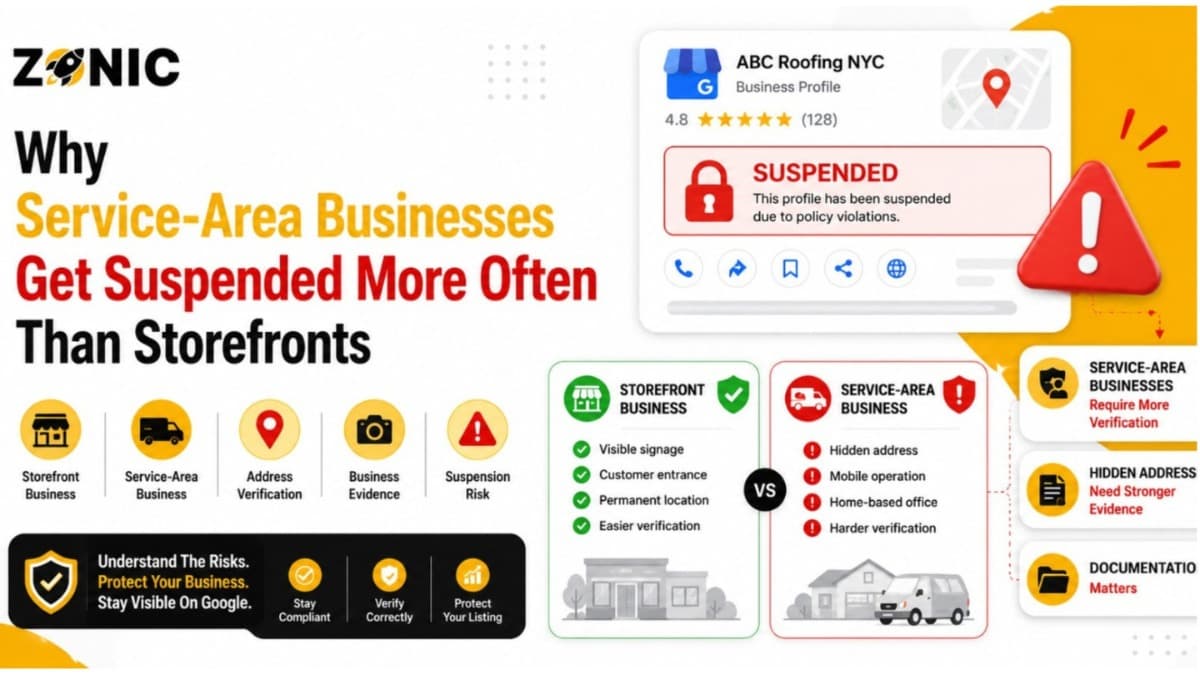
A Google Business Profile can bring serious leads for plumbers, roofers, HVAC companies, cleaners, pest control businesses, mobile mechanics, locksmiths, and other service-area businesses. When someone searches for a nearby service, your profile can show your reviews, phone number, service area, website, photos, and business details.
But service-area businesses often face more Google Business Profile suspension problems than storefront businesses.
The reason is simple. A storefront is easier for Google and customers to understand. It has a public location, signage, business hours, and customers can usually visit. A service-area business is different. It may operate from a home office, private office, warehouse, or small admin location while serving customers at their homes or job sites.
That difference creates more room for confusion.
Google says businesses should use a precise, accurate address or service area, and P.O. boxes or remote mailboxes are not acceptable. Google also says if you do not serve customers at your business address, you should remove the address and only enter your service area.
For service-area businesses, one wrong setting can make the profile look misleading. This blog explains why service-area businesses get suspended more often than storefronts, what mistakes trigger suspensions, and how to keep your Google Business Profile safer.
Why Service-Area Businesses Are Easier to Misunderstand
Service-area businesses do not always have a customer-facing office, which makes verification harder. Google has to understand where the business is based, where it serves customers, and whether the profile represents a real company.
Storefronts Are More Visible in the Real World
A storefront business is usually easier to confirm. A dentist, restaurant, retail shop, or law office may have a visible sign, public entrance, front desk, business hours, and customers walking in.
That does not mean storefronts never get suspended. They can. But their real-world setup is usually more obvious.
A service-area business may not have public signage or walk-in customers. The business might be real, but if the profile setup is unclear, Google may not trust it as quickly.
Service-Area Businesses Often Work Behind the Scenes
Many service businesses run from offices customers never visit. The team may leave from a warehouse, home office, storage location, or private business address every morning.
That is normal for many industries. The problem starts when the Google Business Profile reinstatement makes it look like customers can visit that location.
If customers do not visit the address, Google’s guidance says the address should be removed from the profile and only the service area should be shown.
Address Mistakes Cause Many Service-Area Suspensions
Address setup is one of the biggest reasons service-area businesses get suspended. A profile can look risky when the public address does not match how the business actually serves customers.
Showing an Address Customers Cannot Visit
Many service-area businesses show their address publicly because they think it will help rankings. This is risky if customers do not actually visit that location.
For example, a roofer may work from a home office. A cleaner may dispatch workers from a private address. A pest control company may store equipment at a warehouse but never meet customers there.
If the profile displays that address like a storefront, Google may see it as misleading. Google’s service-area guidance says businesses that do not serve customers at their business address should remove the address and only enter the service area.
Using Mailboxes, Virtual Offices, or Shared Spaces
Another common problem is using an address that does not qualify as a real business location. This includes P.O. boxes, remote mailboxes, and weak virtual office setups.
Google’s guidelines say P.O. boxes and remote mailboxes are not acceptable for business profiles.
Some business owners use these addresses because they want a location in a better city or neighborhood. That may look good at first, but it can become a suspension issue later.
Service-Area Settings Are Often Filled Out Wrong
Service-area settings can help customers understand where your company works. But if those settings are too broad, confusing, or inconsistent, the profile can look less trustworthy.
Service Areas Should Match Real Operations
A service area should reflect where your business actually serves customers. It should not be a random list of every city you want to rank in.
For example, a small plumbing company based in Queens should be careful about claiming service areas across every major city in the region if the company cannot realistically serve them.
Google says service areas help people find your business profile and show where you provide products or services. If your business serves customers at your address and also has a service area, you can enter both. If you do not serve customers at your address, remove the address and only enter the service area.
Broad Service Areas Can Look Suspicious
Some businesses add too many cities because they want more visibility. That can make the profile look stretched or unrealistic.
A real service-area setup should feel natural. It should match your website, team capacity, business documents, and actual customer locations.
If your Google Business Profile says you serve a huge region but your website only mentions one small city, that mismatch can raise questions.
Storefronts Have Stronger Location Proof
Storefronts often have more visible proof that the business exists at the listed address. Service-area businesses may need stronger documents and cleaner profile details to prove the same level of trust.
Storefronts Usually Have Signage and Customer Access
A storefront can often prove its location with photos of exterior signage, interior space, customer entrance, business hours, and public-facing operations.
This gives Google and customers more confidence that the business is real at that location.
Service-area businesses may not have the same type of visible proof. That does not make them less real. It just means they need to be more careful with documents, website consistency, and address settings.
Service Businesses Need Cleaner Supporting Evidence
If a service-area business gets suspended, evidence matters. Google’s appeal process lets business owners appeal suspended or disabled profiles. The appeals tool can show the restricted profile, the moderation reason, and the violated policy link.
For a service-area business, documents should support the business name, address, and operation type. If your profile hides the address but your documents show a base location, that can still help prove the business is real.
Competitors Report Service-Area Businesses More Often
Service-area industries are highly competitive. In markets like NYC, contractors and local service companies often watch each other closely, especially in Google Maps results.
Competitors Look for Address Problems
A competitor may not be able to see your dashboard, but they can see your public profile. If your business shows a suspicious address, a residential location, or a virtual office, they may report it.
A competitor report does not automatically suspend a profile. But it can bring attention to a real policy issue.
If Google reviews the listing and finds a problem, the profile may be restricted or suspended.
Keyword-Stuffed Names Make Reports Easier
Service businesses often add keywords to their business names because the local map pack is competitive.
A company may add “Best Emergency Plumber NYC” or “Roof Repair Near Me” to its profile name. That may help visibility for a short time, but it also makes the profile easier to report.
A clean profile gives competitors fewer weak points to attack.
Common Service-Area Mistakes That Trigger Suspension
Most service-area suspensions come from a few repeated mistakes. These errors usually involve address visibility, service-area setup, business name, documents, or duplicate profiles.
Watch for these common problems:
Showing a public address when customers do not visit
Using a P.O. box, mailbox, or weak virtual office
Adding too many cities to the service area
Using extra keywords in the business name
Creating duplicate profiles for the same business
Listing an address that does not match business documents
Choosing a category that does not match the main service
Showing different phone numbers across the web
Letting old agencies or employees keep profile access
Submitting weak evidence during an appeal
This is the first bullet section. These are the problems that make service-area businesses more vulnerable than clean storefront profiles.
Why Home-Based Service Businesses Face Extra Risk
Home-based service businesses can be legitimate, but they need careful setup. The biggest issue is whether customers visit the home address or the business travels to the customers.
A Home Address Should Not Look Like a Storefront
Many home service businesses start from a home office. That is common. The problem begins when the home address is shown publicly even though customers never visit.
If the business travels to customers, the profile should usually show the service area, not the private address. Google’s manage address guidance says you should only choose not to show your address if your business is a service-area business, and when you hide the address, the profile shows the service area instead.
Privacy and Policy Need to Work Together
Some owners hide the address for privacy but then leave other details confusing. Others show the address because they think Google will trust it more.
The safest setup depends on how the business actually operates. If customers do not visit, the address should not be presented like a walk-in location.
Duplicate Profiles Hurt Service-Area Businesses Quickly
Duplicate listings are common in service industries. They may come from past agencies, old owners, franchise confusion, or business owners creating new profiles after access problems.
Why Duplicates Are More Common for Service Businesses
Service-area businesses often expand into new cities, change phone numbers, move base locations, or hire different marketing teams over time. Each change can leave old listings behind.
A previous agency may have built one profile. A former employee may have created another. The owner may not even know the duplicate exists.
When Google sees multiple profiles for the same business, the same phone number, or the same service area, trust can drop.
Creating a New Profile Can Make Things Worse
When a profile gets suspended, some owners create a new one right away. That feels like a quick fix, but it can create duplicate problems.
The safer move is to review the original profile, fix the issue, gather evidence, and use Google’s appeal process. Google says suspended or disabled profiles can be appealed, and business owners should make sure the profile follows guidelines before submitting the appeal.
How Service-Area Businesses Can Lower Suspension Risk
A service-area business can stay safe on Google, but the profile must be honest, consistent, and easy to verify. The setup should match how the company actually works.
Keep your profile safer with these steps:
Hide your address if customers do not visit
Use only your real business name
Keep service areas realistic
Match your website details to your GBP
Remove duplicate or outdated listings carefully
Keep your primary category accurate
Use one main phone number consistently
Keep proof of your business name and base location
Review profile users and remove old access
Monitor suggested edits regularly
This is the second and final bullet section. These steps help make your profile harder to question and easier to defend.
What to Do If Your Service-Area GBP Gets Suspended
A sudden suspension can feel stressful, but rushing usually makes things worse. The first move should be to find the real issue, not create another listing.
Check the Address and Service Area First
For service-area businesses, start with the address setup. Ask one simple question: do customers visit this location?
If the answer is no, the public address may be the problem. Then check your service area, business name, category, phone number, website, and duplicate listings.
Do not make random edits. Fix the issue that actually creates risk.
Prepare Evidence Before You Appeal
If you need to appeal, gather proof first. Useful evidence may include business registration, license documents, insurance documents, tax documents, utility bills, branded vehicle photos, website screenshots, uniforms, invoices, and photos of equipment or signage.
The appeal should be clear and calm. Explain that the business is a real service-area business, show how it serves customers, and provide documents that support the profile details.
How Zonic Helps Service-Area Businesses Avoid Suspension
Zonic helps service-area businesses across the USA and NYC clean up Google Business Profiles, reduce suspension risk, and handle appeals when a profile has already been restricted.
Service-Area Profile Review
Zonic reviews your business name, address visibility, service-area setup, website consistency, category, duplicate listings, and profile access.
This helps identify the weak spots before Google or a competitor does.
Suspension Appeal Support
If your profile is suspended, Zonic helps organize the right evidence and prepare a clean appeal. The goal is to show that your business is real, eligible, and properly set up.
This is especially helpful for service-area businesses because address and service-area issues can get confusing fast.
Long-Term Profile Protection
After the profile is fixed, Zonic can help improve NAP consistency, reduce duplicate listing confusion, clean up risky wording, and build a safer local SEO foundation.
A recovered profile should not go back to the same risky setup.
Conclusion
Service-area businesses get suspended more often than storefronts because their setup is easier to misunderstand. A storefront usually has a clear public location. A service-area business may work from a private office, home base, or dispatch location while serving customers elsewhere.
That creates more risk around address visibility, service areas, documents, duplicate listings, and competitor reports.
The safest path is simple. Show your business the way it really operates. Use your real business name. Hide your address when customers do not visit. Keep your service area realistic. Match your website, documents, and profile details.
If your service-area Google Business Profile is suspended or you want to prevent future suspension, Zonic can help.
Call Zonic Media today at (302) 726-9736 or visit us at 8 The Green, STE B Dover, Kent, DE 19901 United States for Google Business Profile suspension support across the USA and NYC.