
How to Contact Google Support for GBP Suspension Help (That Actually Works)
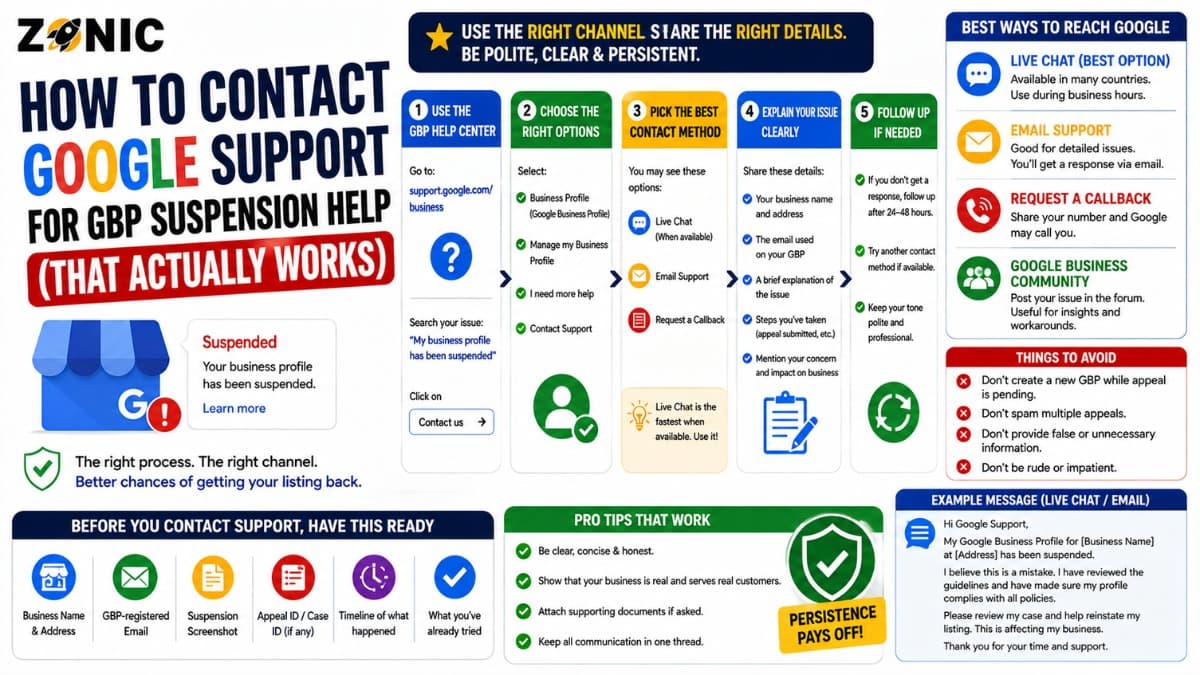
Your Google Business Profile is suspended. Your listing is not showing the way it should. Calls may have slowed down, Google Maps visibility may be gone, and customers may no longer find your business when they search.
That sounds easy, but GBP suspension support does not work like a normal customer service phone line. You cannot always call someone, explain the situation, and get the profile restored in one conversation. Google usually expects suspended or disabled business profiles to go through the official appeal process.
That is why knowing how to contact Google support for GBP suspension the right way matters.
If you use the wrong form, send a weak message, submit mismatched documents, open multiple requests, or create another listing, you can make the case harder to review. If you use the correct appeal tool, prepare evidence first, and explain the issue clearly, your case has a much cleaner path.
This guide explains how to contact Google support for suspension help, what to prepare before opening the appeal, when to use the Help Community, what mistakes to avoid, and when a professional review may save time.
Why GBP Suspension Support Works Differently
Google Business Profile suspension issues are policy and verification issues. That means Google usually needs to review the profile, business details, and evidence before making a decision.
There Is No Simple Shortcut
Many business owners search for a direct Google phone number because they want fast help. The problem is that suspension cases usually require documentation and review.
Google may need to confirm whether the business is eligible, whether the address is allowed, whether the name follows guidelines, whether duplicate listings exist, and whether the evidence matches the profile.
That type of case cannot always be solved through a quick chat.
The Appeal Tool Is the Main Path
For suspended or disabled profiles, the official appeal process is usually the main path. The appeal tool helps Google connect your request to the correct profile and policy issue.
Google’s support page says the appeals tool can show the restricted profile, the reason for the moderation action, and a link to the violated policy. That information is important because it tells you what Google is actually reviewing.
If you skip this process and use the wrong support path, you may lose time.
How to Contact Google Support for GBP Suspension Help
The safest starting point is the official Business Profile appeals tool. Make sure you are signed in with the Google account that manages the suspended profile.
Step 1: Use the Correct Google Account
Before opening the appeal tool, confirm which Google account owns or manages the business profile.
If you are signed in with the wrong account, you may not see the profile. You may also see a message saying there is nothing to appeal.
This is common when an old employee, old agency, or different Gmail account manages the listing.
Step 2: Open the Business Profile Appeals Tool
Once you are in the right account, open the appeal tool and select the restricted business profile.
Google may show the moderation reason and the related policy. Read it carefully.
Do not rush to submit the appeal before understanding what issue Google is pointing to.
Step 3: Submit the Appeal Carefully
When the profile and reason are shown, submit the appeal only after checking that the profile information is accurate.
If Google gives you the option to add evidence, use it. But prepare the documents before opening the evidence form because Google says evidence must be submitted within 60 minutes once the form is opened.
What to Prepare Before Contacting Google
Good support requests are built before the form is submitted. Weak preparation is one of the biggest reasons business owners struggle with suspension help.
Check the Profile for Policy Risks.
Review the business name, address, service area, category, phone number, website, hours, and recent edits.
Look for issues such as keyword-stuffed names, virtual office addresses, mailboxes, public addresses for service-area businesses, wrong categories, duplicate listings, or business details that do not match your website.
If the profile still has a problem, contacting support may not fix it.
Prepare Matching Evidence
Google lists examples of evidence that can help with appeals, including official business registration, business license, tax certificates, and business utility bills such as electricity, phone, water, or internet. Google also advises that documents should match the business name and address on the profile.
Evidence Checklist for GBP Suspension Support
Use this checklist before submitting evidence to Google.
Evidence Type | When It Helps | What to Check |
Business registration | Name and legal existence | Name matches profile or DBA |
Business license | Regulated or licensed industries | Address and business name match |
Tax certificate | Official business proof | No conflicting name or address |
Utility bill | Address verification | Business name and address match |
Lease document | Storefront or office proof | Location matches profile |
Storefront photos | Customer-facing location | Signage and entrance are clear |
Branded vehicle photos | Service-area business proof | Business name, logo, or phone visible |
Website screenshots | Service and identity support | NAP and services match profile |
The goal is not to submit the most files. The goal is to submit the clearest proof.
What to Write in Your Google Support Message
Your appeal or support message should be short, factual, and easy to review. Google reviewers do not need a long emotional story.
Keep the Message Focused
Explain the business, the corrected issue, and the evidence attached.
A strong message may say:
“Our Business Profile was suspended. We reviewed the profile and corrected the business information to match our real-world business details. The attached documents support the business name and address shown on the profile. Please review the evidence and consider reinstating the profile.”
This kind of message is clear and professional.
Do Not Blame Competitors
Avoid saying competitors are reporting you unless you have strong proof. Do not write a long complaint about lost revenue.
The support message should focus on eligibility, accuracy, and evidence.
Google needs to know whether the profile follows the rules.
Common Reasons Google Support Does Not Help Quickly
Sometimes business owners say, “I contacted Google, but nothing happened.” In many cases, the problem is not only Google’s response time. The request itself may be weak or incomplete.
The Wrong Form Was Used
Not every Google support form is meant for suspended profiles. A general contact form may not handle a suspension case properly.
For suspended or disabled profiles, use the appeal process first.
The Evidence Was Mismatched
If your documents show a different name, address, or business identity, the appeal may be harder to approve.
For example, your profile may show a city keyword in the business name, but your license may show only the legal brand. Your profile may show an address that customers do not visit, while your documents show a home or mailing location.
Those details need review before submission.
The Profile Still Violates Guidelines
Support cannot fix a profile that still appears to break the rules.
If the profile has a keyword-stuffed name, fake address, duplicate listing, or unsupported service-area setup, fix the issue first.
When to Use Google Business Profile Help Community
Google Business Profile Help Community can be useful when you are stuck, confused, or unsure why the appeal tool is not working.
Good Uses for the Help Community
The Help Community can help when you cannot find the right path, do not understand a message in the appeal tool, or need general direction on next steps.
It can also be useful when the profile is suspended but the appeal option does not appear.
Community guidance is not the same as guaranteed reinstatement, but it can help you avoid obvious mistakes.
Do Not Share Private Information Publicly
If you post in the community, do not share private documents, customer information, tax IDs, bank details, passwords, or sensitive business records.
Keep public posts general. Use official forms for private evidence.
Mistakes to Avoid When Contacting Google Support
A suspension case can become harder when business owners act too quickly. Keep the case clean and avoid actions that create confusion.
Avoid these mistakes:
Creating a new Business Profile for the same business
Submitting multiple appeals before Google responds
Using the wrong Google account
Uploading documents that do not match the profile
Sending long emotional messages instead of evidence
Changing the business name repeatedly
Using a fake address, mailbox, or unsupported virtual office
Ignoring duplicate profiles
Deleting the original profile without checking history
Contacting support before fixing the actual issue
Google says not to create a new Business Profile for the same business while the appeal is under review and not to submit multiple appeals for the same issue before receiving a decision.
What to Do After Google Responds
The next step depends on the answer you receive. Do not make random edits right after the decision.
If the Appeal Is Approved
If Google approves the appeal, review your profile carefully after it returns.
Check the name, address or service area, phone number, website, category, hours, services, photos, and manager access.
Do not make several major edits right away unless something is clearly wrong.
If the Appeal Is Not Approved
If the request is denied, read the status carefully. Google says an additional review may be available after a denied request, and you can provide evidence that was not included with the original appeal.
Do not submit the same weak evidence again.
Review what was missing, gather stronger proof, and prepare a clearer request.
If There Are Issues After Reinstatement
Google says if you have issues with a reinstated profile, you can contact Google Business Profile Help.
This is different from appealing a suspended profile. Once the profile is reinstated, the issue may involve profile access, edits, visibility, verification, reviews, or other profile functions.
How Zonic Helps With GBP Suspension Support
Zonic helps businesses prepare cleaner Google Business Profile suspension cases before they contact support or submit an appeal.
Suspension Case Review
Zonic reviews the profile status, suspension reason, business name, address setup, service area, category, phone number, website, recent edits, and duplicate listing risks.
The goal is to find what may have caused the suspension.
Evidence and Appeal Preparation
Zonic helps check whether your documents match the profile. If the evidence is weak, outdated, or confusing, Zonic helps identify what should be improved before submission.
A stronger appeal is usually simple, factual, and supported by matching proof.
Additional Review Support
If the first appeal was denied, Zonic can help review what may have been missing and prepare a stronger additional review request when that option is available.
The goal is not to spam Google support. The goal is to give Google a cleaner case.
Conclusion
Contacting Google support for GBP suspension help works best when you use the correct path and prepare before submitting anything.
Start with the official Business Profile appeals tool. Sign in with the correct account. Review the moderation reason. Fix profile risks. Gather matching evidence. Submit a clear appeal. Avoid creating another listing or sending repeated appeals before Google responds.
If your profile is reinstated but still has problems, then Google Business Profile Help may be the right next step.
If you need help with a suspended profile, you can reach out to Zonic for a review before contacting Google. Zonic can help check your profile setup, evidence, duplicate risks, and appeal message so your case is easier to understand.
Call Zonic Media at (302) 726-9736 or visit 8 The Green, Suite B, Dover, DE 19901 to request Google Business Profile suspension support for your business in New York City or anywhere across the United States.