
How to Choose the Right Primary Category on Google Business Profile
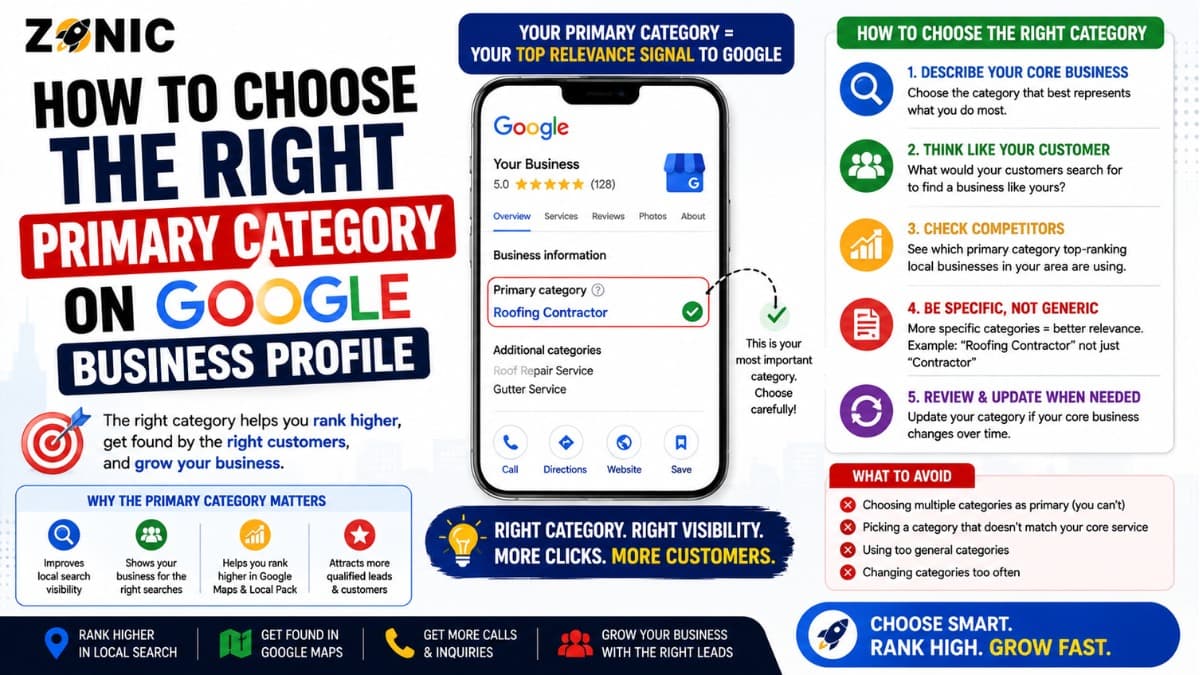
Your Google Business Profile primary category is one of the most important choices you make when setting up or optimizing your local listing. It tells Google what your business mainly is, which searches your profile should be considered for, and how your listing should be understood in local results.
A strong Google Business Profile primary category should describe your core business as accurately as possible. It should not be chosen only because it has a popular keyword. It should not be copied blindly from a competitor. It should not be changed every week to test rankings.
Google’s own guidance says to choose categories that complete the statement, “This business is a,” rather than “this business has a.” Google also recommends choosing the fewest number of categories needed to describe your overall core business.
That makes GBP category selection a balance between accuracy, search visibility, and long-term profile safety.
This guide explains how to choose the right primary category, how secondary categories should support it, what mistakes to avoid, and when it may make sense to update your category.
Why the Primary Category Matters So Much
The primary category helps Google understand the main identity of your business. It is not just a small profile detail. It affects how your business is interpreted in local search and Google Maps.
It Shapes Local Relevance
Relevance is one of Google’s main local ranking factors. Google uses your profile information to decide whether your business matches a customer’s search.
If your primary category is too broad or inaccurate, Google may not connect your profile to the right searches.
For example, a company that mainly installs and repairs roofs should usually be clearly categorized around roofing, not general remodeling. A dentist should not choose a broad health category if a dental category better describes the business.
A more accurate category gives Google a clearer signal.
It Influences Customer Expectations
Customers also see your category. It helps them understand what kind of business they are looking at before they call.
If your category does not match your services, customers may become confused. A customer searching for an emergency plumber does not want to land on a profile that looks like a general home improvement company.
Your category should make the customer think, “Yes, this is the type of business I need.”
What Google Means by “Primary Category”
The primary category is the main category assigned to your Google Business Profile. It should describe the core business, not every service, product, or feature you offer.
Think “This Business Is A”
Google recommends choosing categories by thinking about what the business is, not what the business has or offers as one smaller feature.
For example, a hotel with a restaurant should not use “Restaurant” as its primary category if the main business is a hotel. The restaurant may need its own profile if it operates as a separate public-facing business.
The category should describe the main business identity.
Specific Is Usually Better Than General
Google says businesses should choose a specific category from the available list when possible.
A specific category helps Google understand your niche more clearly. “Italian restaurant” is more useful than “Restaurant” when the business is truly an Italian restaurant. “Roofing contractor” is stronger than a broad construction label when roofing is the main service.
General categories are useful only when no better specific category fits.
How to Choose the Right Primary Category
Choosing the right category starts with your actual business model, not just SEO research. The category should fit what you sell, what customers buy, and what your company is known for.
Identify Your Main Revenue Service
Start with the service or product that drives the business.
Ask yourself: what does the business mainly sell? What service brings the most qualified leads? What do customers hire you for most often? What would a customer call this type of company?
If 80% of your work is roof repair and replacement, your category should support roofing. If most of your work is HVAC service, the category should support HVAC. If your business is mainly dental care, the category should support dentistry.
Do not choose a category for a small side service if it does not represent the business.
Match the Category to Customer Search Intent
Your primary category should also align with how customers search.
A customer usually searches by business type or service need. They may search “roofing contractor near me,” “HVAC company,” “dentist near me,” “personal injury lawyer,” or “med spa near me.”
Choose the category that best connects your business to those real searches.
The goal is not to force keywords. The goal is to make the business easier for Google and customers to understand.
Use Google’s Available Category Options
You cannot create your own custom primary category. You must choose from Google’s available category list.
When editing your profile, type a few words related to your business and review the options that appear. Choose the closest accurate category.
If the perfect category does not exist, choose the most specific available option that describes the overall business.
Primary Category vs Secondary Categories
Your primary category should describe the main business. Secondary categories can support additional real services, but they should not confuse the profile.
Secondary Categories Support the Main Category
Secondary categories are helpful when they describe services your business truly provides.
For example, an HVAC company may use a main HVAC category and add related secondary categories for air conditioning, heating, or furnace service if those options fit. A roofing company may add related categories if it also provides gutters, siding, or skylight service.
The secondary categories should support the business, not stretch it into unrelated areas.
Do Not Add Every Possible Category
Adding more categories does not automatically mean better ranking. Too many unrelated categories can make the profile look unfocused.
Google advises choosing the fewest categories needed to describe your overall core business.
Use secondary categories only when they are accurate and meaningful.
Examples of Better Primary Category Choices
The right category depends on the business model. The examples below show how to think about the decision.
Business Type | Weak Category Choice | Better Primary Category Choice | Why It Works |
Roofing company | General contractor | Roofing contractor | The main service is roofing |
HVAC company | Contractor | HVAC contractor | It matches heating and cooling intent |
Dental clinic | Medical clinic | Dentist | It is more specific |
Med spa | Spa | Medical spa | It better matches the actual service model |
Personal injury firm | Law firm | Personal injury attorney | It matches the main practice area |
Pizza shop | Restaurant | Pizza restaurant | It is more specific |
Local SEO agency | Marketing consultant | Internet marketing service or Marketing agency | It depends on the core service positioning |
Use Examples as Direction, Not Rules
These examples are not universal. A business should still choose based on its real services, market, and available Google category options.
For example, one agency may be best described as “Marketing agency,” while another may fit “Internet marketing service” better. One clinic may fit “Medical spa,” while another may fit a more specific treatment category.
Accuracy comes first.
How to Research the Best GBP Category
Research can help, but it should not replace common sense. The best category is usually the one that matches your real business and appears consistently among relevant competitors.
Check Top Local Competitors
Search your main service keyword in your city. Look at the businesses that appear in the local pack and Maps results.
Check what category they use. You may see patterns.
If most top-ranking roofers use “Roofing contractor,” that is a useful clue. If most top dental offices use “Dentist,” that confirms the obvious. If competitors in a niche use a more specific category, research whether that category fits your business too.
Do not copy a competitor if their business model is different from yours.
Compare Category With Website Positioning
Your category should match your website.
If your profile says “HVAC contractor,” your website should clearly discuss HVAC services. If your profile says “Roofing contractor,” your website should have strong roofing content. If your profile says “Personal injury attorney,” your website should support that practice area clearly.
A profile and website that tell the same story are easier to trust.
When to Change Your Primary Category
Changing your primary category can affect visibility because it changes how Google understands the business. Make the change only when there is a clear reason.
Change It If It Is Wrong
If the current category does not describe your main business, fix it.
For example, if a roofing company is listed as a general contractor but roofing is the main service, changing the category may be the right move.
If a med spa is listed only as a beauty salon but medical spa services are the core business, a more accurate category may be needed.
Change It After a Business Model Shift
Sometimes the business changes. A company may stop offering one service and focus on another. A law firm may shift practice areas. A clinic may add or remove major services.
If the core business has changed, the primary category may need to change too.
Make sure the website, services, photos, business description, and citations also support the new direction.
Do Not Change It Too Often
Do not keep switching categories every few days to test ranking changes. Frequent major edits can make the profile look unstable.
Choose carefully, update when needed, and monitor performance over time.
Category Mistakes That Can Hurt Visibility
Category mistakes can weaken relevance and confuse customers. Some mistakes may also increase profile risk if they make the business look misleading.
Avoid these problems:
Choosing a broad category when a specific one fits better
Selecting a category only because it has a keyword
Adding categories for services you do not provide
Copying competitors without checking your own business model
Using secondary categories that do not fit
Changing the primary category repeatedly
Choosing a category that conflicts with your website
Treating categories as a place to stuff keywords
Ignoring category changes after a business model shift
Using one profile to represent several separate businesses
Google says categories should describe the overall core business and should not be used as keywords or attributes.
Quick GBP Category Selection Checklist
Use this checklist before choosing or changing your primary category.
Does the category complete the sentence “This business is a”?
Is it the most specific accurate option available?
Does it match the main service or revenue source?
Does it match what customers search for?
Does it match the website’s main service pages?
Does it match signage, documents, and customer-facing branding?
Do top local competitors with similar business models use it?
Are secondary categories accurate and related?
Would a customer understand the business from this category?
Can the business defend this category if Google reviews the profile?
If the answer is yes to most of these questions, the category is likely a strong fit.
How Category Choice Affects Different Local Businesses
Category selection matters in every industry, but the impact can look different depending on how customers search.
Home Service Businesses
Roofers, plumbers, electricians, HVAC companies, cleaners, and restoration companies should usually choose a category tied closely to the main service.
These businesses often depend on urgent searches. A broad category may make it harder to show up for high-intent service terms.
The profile should match the services customers need quickly.
Healthcare, Legal, and Professional Services
Dentists, doctors, attorneys, accountants, med spas, and consultants need categories that match trust and specialty.
A law firm may need a more specific legal category if one practice area drives most leads. A clinic may need a category that reflects its main treatment model.
The wrong category can attract the wrong type of inquiry.
Restaurants and Retail Businesses
Restaurants and retail businesses often benefit from specific categories because customers search by type.
A pizza restaurant, vegan restaurant, jewelry store, flooring store, or furniture store should choose the category that best matches how customers shop.
Specific categories help customers decide faster.
How Zonic Helps With GBP Category Selection
Zonic helps businesses choose the right Google Business Profile category based on search intent, business model, competitor patterns, and profile safety.
Category and Profile Audit
Zonic reviews your primary category, secondary categories, services, business description, website, photos, reviews, and local visibility.
The goal is to identify whether your current category supports or limits your ranking potential.
Competitor and Search Intent Review
Zonic checks how similar businesses appear in Google Maps and which categories align with real customer searches.
This helps avoid guessing and reduces the risk of choosing a category that does not match the market.
Full Google Business Profile Optimization
Category selection is only one part of GBP optimization. Zonic also helps with services, photos, reviews, citations, website alignment, duplicate risks, and ranking recovery.
The goal is a profile that is accurate, clear, and built for local leads.
Conclusion
Choosing the right Google Business Profile primary category is not a small detail. It helps Google understand your business, affects which local searches your profile can match, and shapes what customers expect when they see your listing.
The best category is usually the most specific and accurate option that describes what your business mainly is.
Do not choose a category only because it has a keyword. Do not copy competitors blindly. Do not add unrelated secondary categories. Do not keep changing the primary category every few days.
Instead, choose a category that matches your real business model, main service, website content, customer search intent, and available Google category options.
If you need help with GBP category selection, Zonic can review your profile and help choose a category strategy that supports local visibility without creating confusion.
Call Zonic Media at (302) 726-9736 or visit 8. The Green, Suite B, Dover, DE 19901 to request a Google Business Profile category and local visibility audit for your business in New York City or anywhere across the United States.