
Why You Should Never Create a New GBP While Your Appeal Is Pending
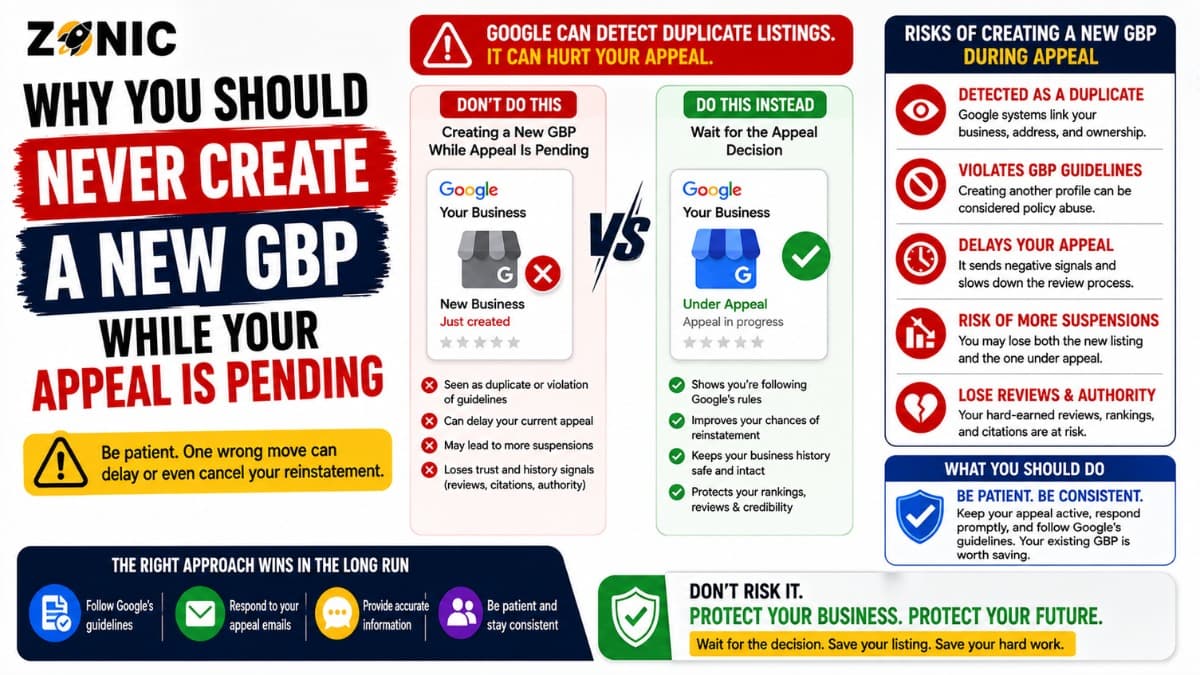
Your Google Business Profile is suspended. Calls slow down. Your Google Maps visibility disappears. Leads that came from local search suddenly stop.
Many business owners think the fastest solution is to create another Google Business Profile and start over. It feels simple. The old listing is stuck in appeal, so a new listing looks like a fresh chance.
Google clearly says not to create a new business profile for the same business while an appeal is under review. The reason is simple. A second listing can create duplicate profile issues, confuse the review process, and make it harder for Google to understand which profile represents the real business.
If the suspended listing had reviews, photos, ranking history, and customer trust, replacing it with a new profile may also mean losing the value your business already built.
This guide explains why creating another listing during a pending appeal is risky, what to do if you already made one, and how to handle the suspension process more safely.
What Creating a New GBP During Suspension Means
Creating a new GBP during suspension means opening another Google Business Profile for the same business while the original profile is suspended, disabled, or waiting for an appeal decision.
This may include using the same business name, phone number, website, address, category, or service area.
It may also include creating a slightly changed version of the same business, such as using a different phone number, adding city keywords, hiding the address, or changing the category to avoid detection.
That does not create a clean restart. It often creates a duplicate profile problem.
Google’s duplicate profile guidance says you can have only one Business Profile for each business. It also says multiple profiles for the same business may mislead customers and are against Google’s policies. If a profile is considered a duplicate, it may not show on Google Search or Maps.
Why Creating Another Profile Feels Tempting
A suspended profile can affect real business revenue. For local SEO companies, Google Maps visibility often drives calls, quote requests, bookings, and directions.
The Business Still Needs Leads
Roofers, plumbers, HVAC companies, dentists, lawyers, restaurants, med spas, cleaning companies, and contractors often depend on Google for local demand.
When the listing disappears, the business owner may feel forced to act quickly.
A new profile feels like an emergency fix. It looks like a way to get back on Maps while the appeal is still waiting.
The Shortcut Can Create a Bigger Problem
Starting another profile is easy. Recovering from duplicate confusion is not.
If Google connects the new listing to the suspended one, the system may treat it as a duplicate or another attempt to represent the same business.
That can create more review delays, visibility problems, or another suspension.
Instead of one profile under review, you may end up with two listings that both have problems.
What Google Says About Pending Appeals
Google’s suspended profile guidance is direct. It says not to create a new Business Profile for the same business while your appeal is under review.
The Appeal Is for the Original Profile
The appeal process is built to review the restricted profile. Google looks at the moderation reason, the violated policy, the profile details, and any evidence submitted.
A second listing adds noise to that process.
Now Google may see two profiles that appear connected. They may share the same phone number, website, address, service area, owner account, or business name.
That makes the case less clean.
Evidence Needs to Match the Profile
Google’s appeal process may allow evidence, and Google says evidence should be submitted within the available window when prompted. The evidence should support the business details connected to the appealed profile.
If you create another listing with different details, your documents may become harder to connect.
One profile may show a public address. Another may hide it. One may use the legal business name. Another may use a keyword-heavy version. One may have a different category.
Those differences can create doubt.
How Duplicate GBP Issues Hurt Recovery
A duplicate GBP during appeal can damage the recovery process because it creates uncertainty. Google needs to know which listing is the correct one.
Duplicate Profiles Can Be Filtered
Google says duplicate profiles may not show on Search or Maps. That means the new listing may not solve the visibility issue anyway.
Even if it appears for a short time, it may later be flagged.
That can leave the business in a worse position than before.
Duplicate Listings Split Trust
The original profile may have customer reviews, photos, service history, posts, and engagement.
A new profile usually starts from zero.
If both listings exist, customers may see mixed information. Google may also struggle to decide which version should be trusted.
This is especially risky if an old agency, previous owner, or employee already created older listings in the past.
Why the Original GBP Is Usually Worth Saving
A suspended listing can still be valuable. It may not be visible publicly, but the profile history can matter.
Reviews Are Hard to Replace
Customer reviews are one of the strongest trust signals on a Google Business Profile.
A new listing does not automatically inherit those reviews.
If the original profile has years of customer feedback, saving it is usually better than starting with an empty profile.
Ranking History Has Value
An older profile may have past visibility, customer engagement, photos, services, and established signals.
A new profile has no real history.
Even if the new profile is verified, it may not perform the same way. Recovery is often safer when the original profile is legitimate and the issue can be corrected.
What to Do If You Already Created Another Listing
If you already created a new business listing during the reinstatement process, pause before taking more action.
Do not create more profiles.
Do not delete anything blindly.
Do not keep changing the name, phone number, or address to test what works.
Identify the Main Profile
Start by finding which profile should represent the business.
Usually, the main profile is the one with the correct business details, strongest review history, proper ownership access, and most accurate connection to the real business.
Document both listings. Note the business name, phone number, website, address or service area, category, status, reviews, and manager access.
This helps you avoid closing or removing the wrong one.
Review Duplicate Status
Search Google Maps for your business name, old phone numbers, current phone number, website URL, current address, old address, and main service keywords.
If two listings appear for the same business, treat the situation carefully.
Google has separate guidance for resolving duplicate profiles and ownership issues. If a verified profile already exists for the same business, the proper action may involve ownership access or duplicate resolution instead of creating another listing.
Safer Steps While Your GBP Appeal Is Pending
The safer path is to keep one clean recovery case. Focus on fixing the suspended profile rather than replacing it.
Step 1: Check the Appeal Tool
Open the Google Business Profile appeals tool from the account connected to the suspended profile.
Step 2: Review the Profile for Policy Risks
Look at the business name, address, service area, category, phone number, website, hours, and recent edits.
Common risks include keyword-stuffed names, fake addresses, unsupported virtual offices, public addresses for service-area businesses, wrong categories, and duplicate listings.
Fix what is inaccurate before adding more evidence.
Step 3: Gather Matching Evidence
Use evidence that supports the same business name and address or service model shown on the profile.
Helpful evidence may include business registration, business license, tax document, utility bill, lease, insurance document, storefront photos, signage, branded vehicle photos, or service-area proof.
The goal is not to upload many files. The goal is to upload clear proof.
Step 4: Avoid Repeated Appeals or Random Edits
Do not submit multiple appeals before Google responds. Do not create a new listing. Do not keep making major edits while the case is being reviewed.
Safer Recovery Plan
Step | Action | Why It Helps |
1 | Check appeal status | Confirms what Google is reviewing |
2 | Review policy risks | Finds the likely suspension issue |
3 | Search for duplicate listings | Prevents profile confusion |
4 | Match website and citations | Supports business consistency |
5 | Gather clear evidence | Helps prove the business is real |
6 | Avoid new listings | Keeps the case clean |
7 | Wait for Google’s decision | Prevents conflicting actions |
8 | Plan next step after response | Avoids panic changes |
Google Business Profile Appeal Mistakes to Avoid
Many appeal problems happen because business owners act too quickly. A suspended profile needs careful handling.
Avoid these mistakes:
Opening another listing for the same business
Changing the business name again and again
Adding city or service keywords to the business name
Using a fake address, mailbox, or unsupported virtual office
Creating profiles for every city you serve
Uploading documents that do not match the profile
Marking the wrong listing as permanently closed
Deleting the original profile without checking review history
Submitting repeated appeals before Google responds
Ignoring old duplicates created by past agencies
These actions can make the appeal harder to review and may delay reinstatement.
How Zonic Helps With Suspended GBP Appeals
Zonic helps businesses avoid risky actions while a Google Business Profile appeal is pending.
Suspension Review
Zonic reviews the appeal status, suspension reason, business name, address setup, service area, category, website, phone number, and recent edits.
The goal is to find what may have triggered the suspension before another mistake is made.
Duplicate Listing Cleanup
If another listing was already created, Zonic reviews whether it is causing duplicate confusion.
The next step may involve documenting the listings, identifying the correct profile, and planning a safe cleanup process.
Evidence Preparation
Zonic helps prepare evidence that matches the original profile. This may include checking business documents, address proof, service-area proof, photos, website consistency, and citations.
A strong appeal should be calm, accurate, and easy for Google to understand.
Conclusion
Creating another Google Business Profile while your appeal is pending may seem like a shortcut, but it can create bigger problems.
It can trigger duplicate listing issues, confuse Google’s review process, weaken your evidence, and put the new profile at risk too.
The better approach is to protect the original listing. Check the appeal status. Review the policy issue. Fix inaccurate details. Look for duplicates. Gather matching evidence. Then wait for the official decision.
If you need help, you can reach out to Zonic for a Google Business Profile suspension and appeal review. The team can help you understand what went wrong, what to avoid, and how to move forward safely.
Call Zonic Media at (302) 726-9736 or visit 8. The Green, Suite B, Dover, DE 19901 to request help with a suspended Google Business Profile in New York City or anywhere across the United States.