When your business disappears from Google Maps, it can feel like someone turned off your main lead source overnight. One day, customers can find your company, call from the profile, request directions, read reviews, and visit your website. The next day, the profile is gone, buried, suspended, or no longer showing for the searches that used to bring calls.
For local businesses, that kind of visibility drop can be serious.
A roofer may stop getting emergency repair calls. A dentist may lose appointment requests. A plumber may stop showing in “near me” searches. A restaurant may lose direction requests. A local agency may stop appearing when customers search by service and city.
If your business disappeared from Google Maps, the first thing to understand is this: not every disappearance has the same cause.
Sometimes the profile is suspended. Sometimes it is unverified. Sometimes it is filtered because of duplicates. Sometimes it still exists but has lost ranking. Sometimes the business information changed. Sometimes Google is reviewing an edit. Sometimes the profile violates a policy. Sometimes the profile shows for your brand name but no longer appears for service searches.
That is why the recovery process must start with diagnosis.
This guide explains the most common reasons for a lost Google Maps ranking, how to tell the difference between a visibility issue and a suspension, and what steps can help your business get back on Google Maps safely.
First, Check Whether the Profile Is Gone or Just Not Ranking
Before fixing anything, you need to know what actually happened. A profile that is suspended needs a different recovery process than a profile that simply dropped out of the local pack.
Search for Your Exact Business Name
Start by searching your exact business name on Google Search and Google Maps. Use the same spelling shown on your profile.
If the profile appears for the business name but not for service keywords, you likely have a ranking or relevance issue.
If the profile does not appear at all, the issue may be suspension, verification, duplicate filtering, account access, or profile removal.
This first check helps separate a true disappearance from a ranking decline.
Check the Google Business Profile Dashboard
Log in to the Google account that manages the profile. Look for warnings, verification requests, disabled status, suspended status, or pending edits.
The dashboard often shows information that customers cannot see publicly.
If Google shows a suspension or disabled message, do not keep making random changes. Review the issue carefully before appealing.
Reason 1: Your Google Business Profile Was Suspended
A suspension is one of the most serious reasons a business disappears from Google Maps. When a profile is suspended, it may no longer appear publicly.
Why Suspensions Happen
Google may suspend a profile when it believes the listing does not follow Business Profile guidelines. Common triggers include keyword-stuffed business names, fake addresses, virtual offices, duplicate profiles, unsupported service-area setups, misleading categories, or suspicious recent edits.
A real business can still get suspended if the profile setup looks risky.
For example, a service-area business may show a public address even though customers do not visit. A company may add extra city names to its business name. A former agency may have created duplicate listings.
How to Handle a Suspension
Do not rush into an appeal before checking the profile. First, identify what may have caused the issue.
Review the business name, address, category, website, phone number, service area, and duplicate listings. Then gather documents that support the real business name and location.
Google’s suspended profile process uses the Business Profile appeals tool, and Google may allow evidence to support the appeal. A stronger appeal usually starts with fixing the issue first.
Reason 2: Your Profile Is Not Verified
If your profile is not verified, it may not appear properly on Google Maps or may have limited visibility.
Verification Confirms Business Control
Verification tells Google that an authorized person manages the business information. Without verification, Google may not trust the profile enough to show it fully.
This can happen with new profiles, recently claimed profiles, profiles with ownership changes, or profiles that need re-verification after major edits.
What to Do Next
Check the dashboard for verification prompts. Google may offer verification by video, phone, email, postcard, or another method depending on the business.
Follow the verification method exactly. If video verification is required, record the business location, signage, tools, equipment, or management access based on your business type.
Do not create a new listing because the first one is not verified. That can create duplicate issues.
Reason 3: Your Business Information Changed Recently
A major edit can trigger review or ranking changes. This can make the profile disappear temporarily or lose visibility.
Risky Edits Can Create Trust Problems
Changes to the business name, address, phone number, website, category, hours, or service area can affect how Google understands the business.
If several major edits happen at once, the profile may look unstable.
For example, changing the name, category, phone number, and website in the same week can make Google re-check the listing.
How to Recover From Edit-Related Drops
Review what changed before the visibility loss. If the change was accurate, make sure the website and citations match. If the change was wrong, correct it carefully.
Avoid making repeated edits every few hours. Let the corrected information settle and make sure your profile, website, and major listings all show the same details.
Reason 4: Duplicate Listings Are Confusing Google
Duplicate listings are a common reason businesses disappear, drop, or get filtered from Maps results.
Duplicates Split Trust
If Google finds two profiles for the same business, it may not know which one should appear. One profile may have old reviews, another may have the correct phone number, and another may have the old address.
This confusion can hurt visibility.
Duplicates often happen when an old agency, previous owner, employee, or automated system created a profile years ago.
How to Check for Duplicates
Search your business name, old phone numbers, old addresses, website URL, and main service keywords on Google Maps.
If you find more than one listing for the same business, do not randomly mark one closed. First, identify which profile is correct.
The correct profile is usually the one with accurate information, real review history, proper ownership access, and the strongest connection to the current business.
Reason 5: Your Category or Services No Longer Match the Search
Sometimes a business is still visible but no longer ranks for important searches. This often happens when relevance signals are weak.
Category Problems Can Reduce Visibility
Your primary category tells Google what your business mainly does. If the category is too broad, wrong, or changed recently, rankings can drop.
A roofing contractor should not rely on a general category if a roofing category better matches the business. A dental office should not choose a category that does not reflect its main service.
The category should match the real business, not just a keyword target.
Services Should Support Real Searches
Add real services that customers search for. A roofer may list roof repair, roof replacement, storm damage repair, flat roofing, roof inspection, and emergency roofing if those services are actually offered.
Google says complete and accurate business information helps it understand a business and match listings to relevant searches.
Reason 6: Your Reviews or Prominence Signals Weakened
Google Maps ranking is not only about having a profile. Prominence also matters.
Reviews Affect Customer Trust
If competitors are getting fresh reviews and your profile has not received a review in months, customers may choose them first.
A profile with old reviews, low ratings, or unanswered negative feedback can lose conversion power even if it still appears.
Google says review count and review score can affect local ranking, and prominence can include information from links, articles, and directories.
Build Prominence Across the Web
Improve trust with steady reviews, accurate citations, useful website pages, local mentions, quality backlinks, and real business photos.
Prominence is not built in one day. It grows when Google and customers see consistent proof across multiple places.
Reason 7: Your Address or Service-Area Setup Is Wrong
Addressing issues can cause both suspension and ranking problems. This is especially important for service-area businesses.
Storefronts and Service-Area Businesses Are Different
If customers visit your location, your address should be accurate and supported by real proof. If customers do not visit your location, your profile should be set up as a service-area business.
A private home, mailbox, weak virtual office, or unsupported shared space can create risk if it is presented as a public business location.
Make the Setup Match Reality
Ask one simple question: can customers walk into this location during business hours and receive service? If yes, a visible address may make sense. If no, the profile should usually show service areas instead of a public address.
Your website, citations, and profile should all support the same setup.
Reason 8: Your Website or Citations Do Not Match the Profile
Google compares business information from many places. If your details are inconsistent, trust can drop.
NAP Consistency Matters
NAP means name, address, and phone number. If your profile shows one phone number, your website shows another, and directories show an old address, Google and customers can become confused. This can affect both ranking and customer trust.
Clean Up Old Business Information
Check your website, footer, contact page, social profiles, directory listings, old citations, and industry platforms.
Update old phone numbers, old addresses, old business names, and broken website links.
A clean online footprint supports a stronger Maps presence.
Quick Diagnostic Table: Why You Disappeared From Google Maps
Use this table to identify the likely issue before taking action.
What You See | Likely Cause | Best Next Step |
Profile gone completely | Suspension, disabled status, or verification issue | Check dashboard and appeal status |
Profile shows by name but not services | Lost ranking or weak relevance | Review categories, services, reviews, and website |
Profile says suspended | Policy issue | Fix profile problems before appeal |
Profile needs verification | Verification or re-verification required | Complete Google’s verification method |
Old listing appears instead | Duplicate profile issue | Identify and resolve duplicates carefully |
Calls dropped after edits | Recent profile change | Review edits and match website/citations |
Competitors replaced you | Prominence or relevance gap | Improve reviews, content, citations, and trust signals |
What Not to Do When Your Business Disappears
Many owners make the situation worse because they panic. The wrong action can create new problems.
Avoid these mistakes:
Do not create a new profile for the same business
Do not keep changing the business name
Do not add extra keywords to the profile name
Do not submit an appeal before fixing policy issues
Do not use a fake address
Do not mark the wrong profile as permanently closed
Do not ignore duplicate listings
Do not upload documents that do not match the profile
Do not make repeated major edits in one day
Do not assume ranking loss and suspension are the same issue
A careful recovery plan is safer than random edits.
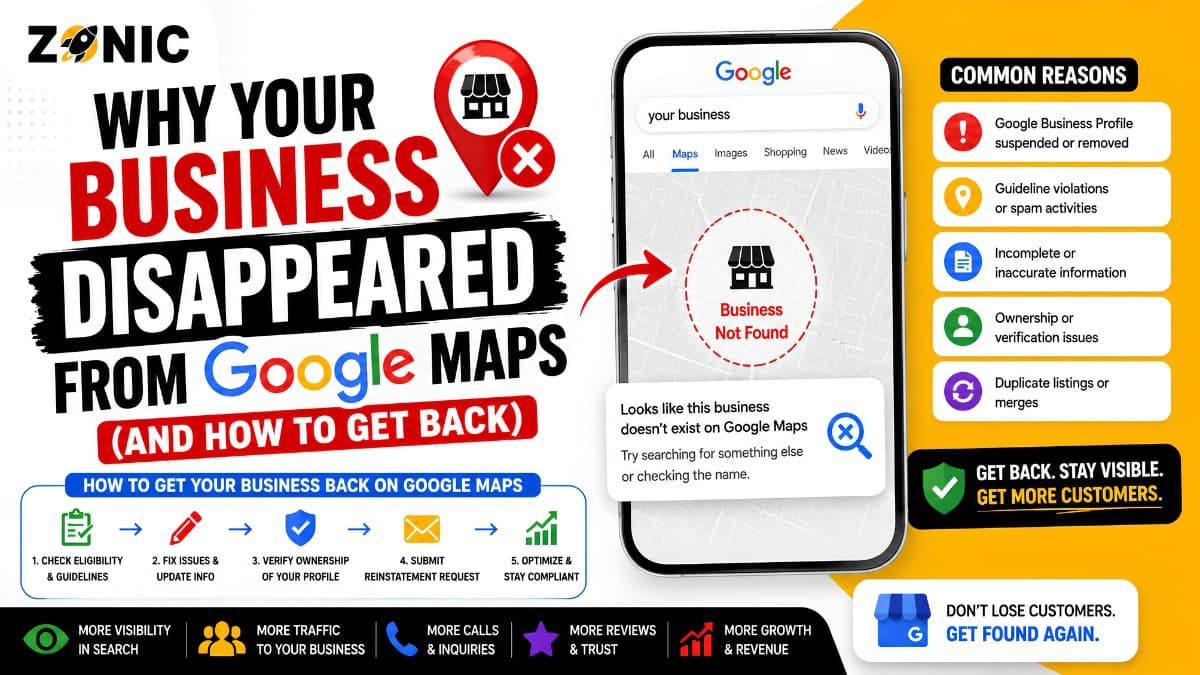
How to Get Your Business Back on Google Maps
Recovery depends on the cause. Start with a clean audit, then take the right action.
Step 1: Confirm the Profile Status
Log in to the Google Business Profile dashboard. Check whether the profile is live, suspended, disabled, pending verification, or under review.
This tells you which path to follow.
Step 2: Review the Profile for Policy Risks
Check your business name, address, service area, category, website, phone number, hours, and duplicate profiles.
Fix anything that looks inaccurate, unsupported, or risky.
Step 3: Match Your Website and Citations
Your website should show the same business name, phone number, service area, and core services as the profile.
Clean up major directories and local listings if they show old information.
Step 4: Appeal Only When the Case Is Ready
If the profile is suspended, prepare the appeal carefully. Use documents that match the business name and address on the profile.
A strong appeal is short, factual, and supported by evidence.
Step 5: Rebuild Ranking Signals
If the profile is live but rankings dropped, focus on relevance and prominence.
Improve services, categories, review activity, photos, website pages, citations, local content, and backlinks. Track calls and ranking movement over time.
How Zonic Helps Businesses Recover Google Maps Visibility
Zonic helps businesses diagnose why they disappeared from Google Maps and build the right recovery plan.
Google Maps Visibility Audit
Zonic reviews your profile status, ranking loss, suspension signs, verification issues, duplicate listings, recent edits, categories, service areas, and website consistency.
The goal is to find the real reason visibility dropped.
Suspension and Reinstatement Support
If your profile is suspended or disabled, Zonic helps review policy risks, prepare supporting documents, and build a stronger appeal path.
This helps avoid rushed appeals and weak evidence.
Ranking Recovery and Local SEO
If your profile is live but your ranking dropped, Zonic helps improve local SEO signals such as reviews, services, photos, citations, website pages, and lead tracking.
The goal is not only to get back on Google Maps. The goal is to turn visibility into calls, bookings, and leads.
Conclusion
If your business disappeared from Google Maps, do not panic and do not guess. First, find out whether the profile is suspended, unverified, duplicated, under review, or simply losing ranking.
Each issue needs a different fix.
A suspension needs policy review and a careful appeal. A verification issue needs proper proof. A duplicate issue needs cleanup. A ranking drop needs stronger relevance, reviews, website support, citations, and prominence signals.
The safest path is to diagnose first, fix the real issue, and then take action.
If your business disappeared from Google Maps or you recently lost Google Maps ranking, Zonic can help review the problem and build a recovery plan.
Call Zonic at (302) 726-9736 or visit 8. The Green, Suite B, Dover, DE 19901 to request a Google Maps visibility audit for your business in New York City or anywhere across the United States.
Frequently Asked Questions
Why did my business disappear from Google Maps?
Your business may have disappeared from Google Maps because the profile was suspended, disabled, left unverified, filtered due to duplicate listings, affected by recent profile edits, or weakened by poor relevance and prominence signals.
Is disappearing from Google Maps the same as losing ranking?
No. A business that disappears completely may have a verification, suspension, profile status, or duplicate listing issue. A business that still appears when searched by name but does not show for service-related searches usually has a ranking or relevance problem.
Can a suspended Google Business Profile come back?
Yes, a suspended Google Business Profile may be restored. The business must identify and correct the issue, prepare accurate supporting documents, and submit a clear appeal through Google’s Business Profile appeal process.
Should I create a new Google Business Profile if mine disappeared?
No. Creating another profile for the same business can cause duplicate listing problems and may make recovery more difficult. It is generally better to diagnose the issue and recover the original profile.
Why does my profile show for my business name but not for services?
When a profile appears for the business name but not for service-based searches, the problem is usually related to rankings. The business categories, services, reviews, website content, local citations, and overall prominence signals may need improvement.